If you’re an email marketer, you’re well aware that getting listed on popular blacklist reputation services—like Suomispam—can have a direct effect on your sender reputation and email deliverability. This can happen to any email domain and IP address associated with sending spam. It can also be caused by sending unsolicited bulk emails and violating laws like the CAN-SPAM Act of 2003.
This comprehensive guide will go over the Suomispam Reputation Blacklist, the most common reasons why many single IP addresses are listed there, and how to remove your email domain or IP address from the blacklist. We’ll also discuss some actionable steps to avoid future listing on Suomispam and other email blacklists.
Read on to know more.
What is the Suomispam Reputation Blacklist?
The Suomispam Reputation Blacklist (or Suomispam Blacklist) is a reputation service used to track and recognize IP addresses that send spam and have low sender reputation. It mainly covers IP addresses and entire ranges that share spam using the Finnish language or those who are related to Finland.
Note that the Suomispam listing doesn’t automatically block spam emails to email providers and only serves as a reputation database for mail servers who intend to find users and organizations associated with sharing malware, unsolicited bulk emails, and Finnish spam.

Most Common Reasons for Listing on the Suomispam Blacklist
Here are the most common Suomispam Reputation Blacklist reasons:
- Suspicious Sending Activity – Your IP address could be listed on the Suomispam listings if your email domains are sending too many emails to various recipients, leading to spam reports. This can also happen if the affected IP address is used for snowshoe spamming or the technique for sending spam emails over several domains to avoid spam filters.
- Spamvertising – If your domain is compromised due to cyber-attacks and used for spamvertising, it could receive high spam complaints and be listed on Suomispam and other blacklist reputation sites (as one of the target sites), along with the spammer who hacked your domain. To gain insights on your domain’s health and how to keep emails out of the spam folder, use our free Email Spam Checker.
- Sending Unsolicited Bulk Email – If your IP address is involved in sending unsolicited bulk emails, it will be considered a spam source and can get you listed on the Suomispam reputation blacklist. This often happens to email marketers who don’t follow the best email sending practices. Consider checking out our email ramp-up schedule guide to know more about proper domain warm-ups.
If you have an escalated spam score on a mail server due to email abuse reports, you’ll likely be listed on Suomispam. This will also cause poor reputation, resulting in low email deliverability and inbox placement.
How to Know if Your IP Address or Domain is Listed in Suomispam
One of the most effective ways of knowing if your IP address is included in Suomispam and other email blacklist tools is by using online blacklist checker tools, such as MxToolbox and DNS Checker. These tools provide essential information about your IP’s status and valuable insights, like server logs and checking for suspicious activity.
You can also contact your hosting provider to check your IP reputation and for any steps you can take to remove your IP address from the Suomispam Reputation Blacklist.
Steps to Delist Yourself From the Suomispam Reputation Blacklist
Getting your IP address or email domain listed in the Suomispam Reputation Blacklist means that it was used in sending spam or previously blacklisted by the service. Here are actionable steps you can take to request delisting from Suomispam:
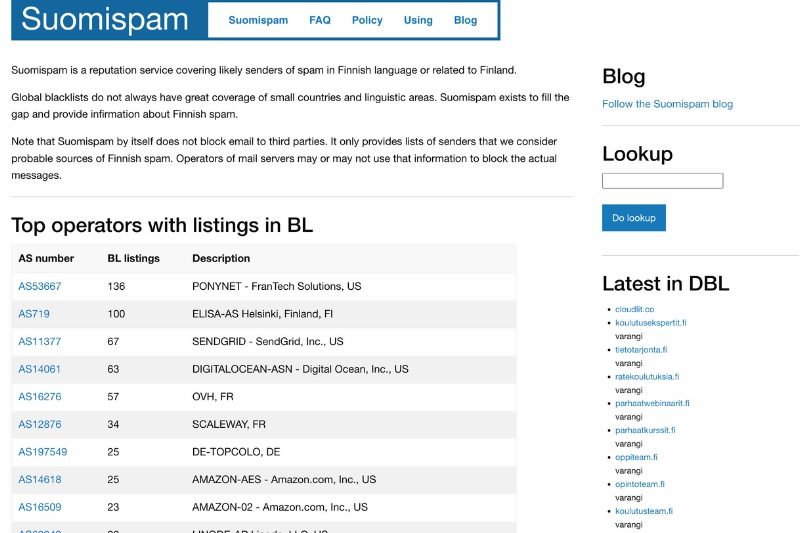
- Delist Request – You can request the removal of your IP on the Suomispam Reputation Blacklist by explaining your case and why your reason for listing is no longer valid. However, Suomispam may take time to observe your claims for delisting, and if you don’t have a high chance of being relisted on the platform.
- Request to Delist Domain – Similar to a typical delist request, you can request to delist your domain on Suomispam by addressing that the grounds for listing it on their platform no longer apply. This also includes if your site was used for spamvertising.
However, if you’re using a shared hosting service for your domain, you must contact your provider to help resolve this issue and remove the domains in Suomispam’s active listings.
- Whitelist Request – It’s important to know that the Suomispam Reputation Blacklist doesn’t have a whitelist, meaning that there’s only a small chance of removal if your entire network is listed. Besides reaching out to your hosting provider, you’ll have to wait until the spam sources on your network decide to transfer to another network.
Best Practices to Avoid Future Listing in the Suomispam Blacklist
Known blacklist reputation services like Suomispam, UCEPROTECT, Barracuda, and others, all primarily target senders that are engaged in spam behavior and unsolicited bulk email campaigns. To avoid this, here are a few best practices you can follow to avoid being listed on the Suomispam Reputation Blacklist in the future:
#1. Warm-Up Your IP Address and Email Domain
Instead of sending bulk emails immediately for your email marketing campaigns, you can gradually increase email volume to warm up your email domain. This helps improve your sender reputation steadily, allowing legitimate familiarity and trust with major email providers. A proper email warm-up strategy also increases your email deliverability and ensures that your emails reach your recipients’ inboxes.
Note: Accelerate Your Email Deliverability with InboxAlly! Our email warm-up service helps you build a strong reputation for your IP and domain faster than ever. By gradually increasing your email sends and using our seed emails for engagement, you can quickly gain the trust of mailbox providers. Start your journey to better inbox placement and higher open rates today with InboxAlly!
#2. Send Personalized Content to Your Subscribers
Another tested way of avoiding spam folders and increasing your email reputation is through targeted messaging or sending personalized content to your recipients. Besides merely personalizing each of the recipient’s names, you can segment your mailing list according to recipient preferences and tailor your message to their needs, interests, and pain points.
Personalized emails encourage positive recipient actions, enhance content relevance, and increase the odds of emails reaching your recipients’ inboxes. This also results in more sales and conversions, driving more profit to your business.
#3. Verify Your Mailing Lists
Checking if each email address on your mailing list is active and legitimate is crucial for your campaign’s success. Following an effective email list hygiene ensures you’re only sending to valid receivers and eliminates issues that can get you flagged for spam, such as spam traps and inactive email addresses. Also, complying with best email list management practices and applying double opt-in helps you maintain a healthy mailing list.
Bear in mind that purchased email lists don’t provide much value to your email campaigns. If anything, you can get punished for sending unsolicited emails to different subscribers based on the CAN-SPAM Act. You can also be blacklisted for sending emails to spam traps, which automatically categorize your emails as spam campaigns.
Note: Boost Your Email Marketing Success with Verified Lists! InboxAlly’s email list verification service helps you clean your existing list by removing invalid and duplicate emails, resulting in lower bounce rates and a positive reputation. Start using InboxAlly today to increase your sender reputation and inbox placement rates!

#4. Avoid Spammy Content
If you’re one of the email senders whose content is filled with spammy phrases (or spam triggers) like “An amazing offer is waiting for you…”, “Buy now!”, etc.; there’s a high chance that spam filters would intercept them.
To have better inbox placement and avoid being flagged as a spam source, you must refrain from using spam triggers and write your emails with proper grammar and spelling. Make them simple and direct to the point; this means avoiding using too many symbols, customized fonts, and colors.
#5. Configure DNS Records and Email Authentication Protocols
While the Suomispam Reputation Blacklist doesn’t necessarily use email authentication protocols like SPF (Sender Policy Framework), DKIM (DomainKeys Identified Mail), and DMARC (Domain-based Message Authentication, Reporting, and Conformance) as a basis for listing IP addresses and domains, it’s still important to configure them properly, along with your MX (Mail Exchange) records. This is to legitimize your emails and improve sender reputation.
To set up your DNS record on Google Workspace and Outlook, follow these steps:
Configuring MX Records
On Google Workspace
- Sign in to your Google Admin console account.
- Go to Menu > Apps > Google Workspace and select Gmail.
- Choose Setup. It should have the following values:
- Priority: 1
- Host: @
- Value: SMTP.GOOGLE.COM
- TTL: 3600
On Microsoft 365
- Log in to the Microsoft 365 admin center.
- Go to Show All > Settings and select Domains.
- In another tab, log in to your hosting provider and find your DNS settings.
- Ensure that the fields are set to the values below:
- Record Type: MX
- Priority: Set to any large value not set already.
- Host Name: @
- Points to address: Copy the value from the admin center and paste it here.
- TTL: 3600

Final Thoughts
The Suomispam Reputation Blacklist is a blacklist reputation database that lists IPs and email domains involved in spam in the Finnish language or related to Finland. To avoid being listed on Suomispam, you must follow ideal mass email sending practices like email warm-ups, including personalized content, and avoiding spammy words.
Another proven way to prevent blacklisting in the future is by using reputable email deliverability software with reputation monitoring, such as InboxAlly. Our tool allows you to monitor your reputation constantly, enabling you to address any issues before they can directly affect your campaigns. You could also track where your emails have been landing in the past 30 days, allowing you to check your campaign strategy’s effectiveness.
Experience Faster Results with InboxAlly! In as little as 4 to 14 days, you can see a dramatic improvement in your email deliverability and open rates. Some clients even report doubling their open rates during this time. Start using InboxAlly today and watch your email campaigns thrive with better engagement and higher revenue!