
Your email deliverability troubleshooting tree: How to identify the problem, choose the right test, and figure out what to fix.
Your email performance has taken a turn for the worse.
Maybe your open rates have dropped. Maybe you’re seeing more bounces than usual. Or maybe someone forwarded you one of your own marketing emails with an unwelcome note: “Found this in my spam folder.”
Something’s wrong. But what?
Here’s where marketers sometimes get into trouble. We identify a symptom, decide what must be causing it, and start making changes. We rewrite subject lines. We clean our lists. We worry about spam trigger words. Sometimes those actions help. Sometimes they don’t.
The problem is that email deliverability isn’t one problem. It’s a collection of potential problems that can produce similar symptoms.
The good news? You don’t have to guess. You just need to know where to start.
How do you troubleshoot email deliverability problems?
The first step in troubleshooting email deliverability is to identify the symptom, not assume the cause. Are your messages landing in spam? Are bounce rates increasing? Are open rates declining, or are mailbox providers rejecting your emails? Each symptom calls for a different starting point. Look at what your data is telling you, choose the test that will help narrow down the possibilities, and use the results to decide what to investigate next.
Here’s a quick guide to choosing your starting point.
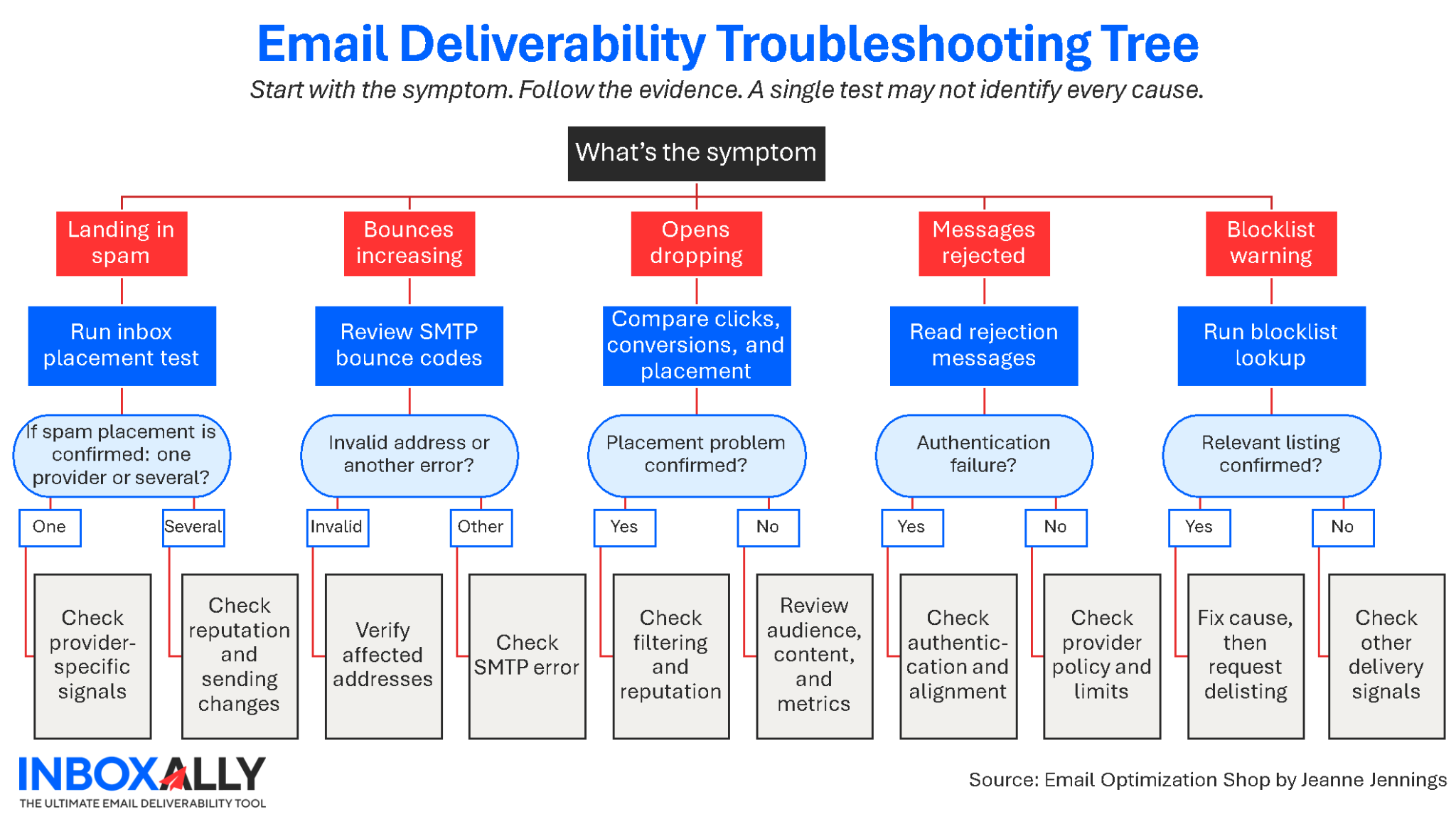
InboxAlly’s free deliverability tools include a guided troubleshooting selector that can help you choose a starting point. Below, we’ll look at what each symptom may mean, which tests can help, and what to do with the results.
1. Your emails are landing in spam. What should you check first?
Start with an inbox placement test. Your email service provider’s delivery rate tells you whether receiving servers accepted your messages. It generally doesn’t tell you whether those messages reached the inbox or were filtered into spam.
This distinction matters more than many marketers realize.
A campaign can have a 99% delivery rate and still have an inbox placement problem. If the receiving server accepted your message and filed it in the spam folder, your ESP will typically count that message as delivered.
I’ve written more about why delivered doesn’t necessarily mean inboxed, including how to test where your messages actually land. The important point here is that you need to measure inbox placement before you can determine whether spam filtering is the problem.
That’s why I’d start with InboxAlly’s free Email Placement Tester.
The tool sends a real campaign through your normal sending platform to 16 test inboxes across Gmail, Outlook, and Yahoo. It reports whether each message landed in the inbox, spam folder, or failed to appear.
The provider-level breakdown is particularly useful. If your test messages reach Yahoo and Outlook inboxes but land in spam at Gmail, that’s a different diagnostic picture than a campaign landing in spam everywhere.
What to do next: If the test confirms a placement problem, run the Email Spam Checker to look for authentication, reputation, content, and technical issues. Review any recent changes to your sending volume, audience, or infrastructure.
One caveat: placement tests use controlled mailboxes. They provide valuable directional evidence, but they can’t reproduce every subscriber’s individual filtering and engagement history.
2. Your bounce rate is increasing. Is your list the problem?
Maybe. First, find out what kind of bounces you’re getting. A hard bounce usually indicates a permanent delivery failure, while a soft bounce generally reflects a temporary condition. But the specific SMTP response provides more useful information than either broad label.
For example, a mailbox that no longer exists is a very different problem from a provider temporarily limiting your sending rate.
Start by reviewing the bounce reports in your ESP. Look for patterns: Are failures concentrated at one mailbox provider? Did they begin after you imported a new list? Are the messages being rejected because addresses are invalid, or because of authentication or reputation concerns?
I once worked with a benefits organization affiliated with a large membership association. The benefits organization operated independently and used its own email marketing platform. Its bounce rates had been climbing steadily for more than a year. When I dug into the data, I noticed something interesting: many of the same email addresses were bouncing month after month, with new ones joining them each month.
The problem wasn’t immediately obvious. The benefits organization’s email platform was configured to suppress an address after three consecutive bounces within a single month. That might sound reasonable, until you consider one important detail: the organization only sent two emails per month.
See the problem? No email address could ever meet the suppression criteria. The list of bouncing addresses just kept growing.
We changed the bounce suppression logic to reflect the organization’s actual sending frequency, and the problem was resolved.
The lesson? When bounce rates rise, don’t just look at the addresses that are bouncing. Look at the rules governing what happens after they bounce. Sometimes the problem isn’t the data. It’s the process.
I’d also investigate where those addresses came from. A sudden increase in invalid addresses may indicate a problem with a recent acquisition source, an aging segment, or inadequate validation when subscribers sign up. Good email list hygiene practices include reviewing how addresses are acquired, verified, and suppressed… not just removing bad addresses after problems appear.
If invalid addresses are the issue, InboxAlly’s Email List Verification can help identify problematic records before your next send.
What to do next: Suppress confirmed invalid addresses, investigate questionable acquisition sources, and address any provider-specific rejection errors. Don’t assume that list cleaning will resolve authentication failures or temporary rate limits.
And don’t automatically delete every address associated with a temporary failure. Some soft bounces resolve without intervention.
3. Your open rates have suddenly dropped. Is deliverability to blame?
A decline in open rates is a reason to investigate deliverability, not proof of a deliverability problem. Opens are an imperfect measurement, particularly because privacy protections and automated image loading can affect the data.
Before diagnosing a spam-folder problem, look at the bigger picture.
Have click rates declined, too? What about conversions? Did the audience change? Have you increased frequency, changed your From name, or started sending different content?
Also, check whether the decline is concentrated at a particular mailbox provider.
If engagement is down across multiple measures and there’s no obvious explanation, run the Email Placement Tester. You can also check your domain and sending IP with InboxAlly’s Spam Database Lookup, particularly if the change was sudden.
What to do next: Let the evidence guide you. Poor placement points toward a deliverability investigation. Healthy placement alongside declining engagement suggests you should also examine your audience, offer, content, and frequency.
Sometimes the email is reaching the inbox. People just aren’t responding.
That’s an important distinction. And it calls for a different solution.
4. Gmail, Yahoo, or Outlook is rejecting your email. What does that mean?
Start with the rejection message and your email authentication results. Mailbox providers may reject or temporarily defer messages for several reasons, including authentication failures, policy violations, sending patterns, and reputation concerns.
The SMTP error code and accompanying explanation can help narrow the possibilities.
For example, Google’s sender guidelines identify authentication requirements for mail sent to personal Gmail accounts. All senders must authenticate with SPF or DKIM; senders exceeding 5,000 messages per day to Gmail accounts face additional requirements, including SPF, DKIM, DMARC, and alignment.
Yahoo and Microsoft also have sender requirements, although the details and thresholds aren’t identical.
If you’re seeing authentication-related errors, inspect a real message using InboxAlly’s Email Header Analyzer. It can help you examine SPF, DKIM, and DMARC results, alignment, and the path the message took. If you’re unfamiliar with these protocols, InboxAlly has a useful explanation of how email authentication works.
The DKIM Checker can help investigate published signing records. If you discover missing or incorrect SPF or DMARC records, InboxAlly also offers free record generators.
One important caution: generating a DNS record isn’t the same as fixing authentication. You need to publish the correct record, ensure your sending systems are configured properly, and confirm that real messages pass the relevant checks.
What to do next: Use the provider’s error message to identify the failing requirement, correct the underlying configuration or sending practice, and retest.
For current requirements, consult the official Google sender guidelines, Yahoo Sender Hub, and Microsoft Postmaster policies.
5. Your domain or IP is on a blocklist. Now what?
First, confirm the listing and determine whether it’s relevant to your delivery problem. Not all blocklists are equally influential, and appearing on one doesn’t automatically explain every deliverability issue.
InboxAlly’s Spam Database Lookup checks domains and IP addresses against more than 50 blocklists.
If you find a listing, look at which organization maintains the list and why the listing occurred. Then compare that information with your actual delivery failures.
A listing may reflect compromised infrastructure, suspicious sending patterns, unwanted mail, or another issue. The appropriate remedy depends on the cause.
What to do next: Resolve the underlying issue before requesting removal, following the blocklist operator’s instructions. Otherwise, you risk being listed again.
And if your lookup comes back clean? That’s useful information, but it doesn’t mean your sender reputation is perfect. Mailbox providers use signals that aren’t necessarily reflected in public blocklists.
What if all your deliverability tests look good, but performance is still poor?
This is where troubleshooting gets interesting.
Imagine that your authentication passes, your domain isn’t on a major blocklist, and your placement test shows good results. Yet clicks and conversions continue to decline.
What now?
I’d resist the temptation to keep running technical tests in the hope that one will eventually reveal a problem.
Instead, look at the relationship between your email program and your audience.
Are you sending more frequently than you used to? Have you broadened your targeting? Are subscribers receiving what they expected when they signed up? Is your content still useful to them?
Mailbox providers consider a variety of signals when making filtering decisions. But even when those decisions are favorable, an email still needs to earn the recipient’s attention.
Passing a deliverability test means you’ve ruled out some potential problems. It doesn’t mean you’ve proven that your email program is working.
Sometimes the next step isn’t another deliverability tool. It’s a closer look at your marketing strategy.
6. What about a new sending domain or a move to a new ESP?
If you’re preparing to send from a new domain or migrate to a different ESP, you have an opportunity to prevent problems before they happen.
Start by verifying that the new sending environment is properly configured. Confirm SPF, DKIM, and DMARC as appropriate, along with alignment, DNS, and any relevant provider requirements.
InboxAlly’s free SPF Record Generator, DMARC Record Generator, and DKIM Checker can help with portions of that process.
Next, consider how you’ll introduce sending volume. InboxAlly’s Warmup Planner can help create a gradual ramp-up schedule.
If you’re planning a migration or launching a new sending domain, it’s worth understanding how email warmup works before establishing your sending schedule. The goal isn’t simply to increase volume. It’s to establish a consistent sending history while watching for signs of trouble.
But don’t mistake a sending schedule for a complete deliverability strategy. Start with a permission-based, engaged audience, monitor results by provider, and adjust when the evidence warrants it.
A new domain doesn’t need a clever workaround. It needs a sound technical foundation and responsible sending practices.
Email deliverability troubleshooting: Frequently asked questions
What’s the difference between email delivery and inbox placement?
Email delivery generally means a receiving mail server accepted the message. Inbox placement describes where that accepted message was filed, such as the inbox or spam folder. A high delivery rate doesn’t guarantee good inbox placement.
Can SPF, DKIM, and DMARC keep emails out of spam?
They help mailbox providers authenticate your messages and protect against spoofing, but they don’t guarantee inbox placement. Sender reputation, complaints, sending behavior, and other signals also matter.
Can spam words in a subject line cause an email to go to spam?
Content can contribute to filtering decisions, but modern spam filtering is more complex than a simple list of forbidden words. Review the full message, including links, formatting, sender identity, and reputation, rather than assuming one word caused the problem.
What’s the first free tool I should use to test email deliverability?
It depends on your symptom. For suspected spam-folder placement, start with an inbox placement test. For rising bounces, examine the rejection codes and verify questionable addresses. For authentication errors, inspect a real message and its authentication results.
Stop guessing. Start diagnosing.
When email performance drops, it’s tempting to start changing things immediately. New subject lines. Different content. Another round of list cleaning. Maybe even a new sending domain.
But making changes before you understand the problem can waste time — and sometimes make things worse.
Start with what you know. Identify the symptom. Run the test that will give you the most useful evidence. Then decide what to do next.
If you’re not sure where to begin, visit InboxAlly’s free email deliverability tools. The guided troubleshooting selector helps you identify which tools to run, and in what order, based on the problem you’re seeing.
Because the fastest way to fix an email deliverability problem isn’t to try everything.
It’s to figure out what’s actually wrong.
AI Disclosure
This article was written in collaboration with AI, which assisted with brainstorming, outlining, and drafting support.
The analysis, opinions, recommendations, and occasionally contrarian views on email marketing are my own. As always, the perspectives shared here reflect my independent experience working with email marketing, subscriber engagement, and deliverability programs across a wide range of organizations and industries.
About Jeanne Jennings
Jeanne Jennings is a veteran email marketing consultant and strategist with over 20 years of experience. Through her boutique firm Email Optimization Shop, she partners with medium‑to‑enterprise teams in fractional and project roles to audit program performance, design optimization roadmaps, and embed best practices.
She also leads hands-on training workshops, both public and private, to upskill internal teams in email strategy, campaign execution, and use of AI. When she’s not helping clients refine their email programs, you’ll find her teaching digital marketing at Georgetown University (Hoya Saxa!), playing mahjongg (jj❤️🀄) or watching hockey (Let’s Go Caps!).
About InboxAlly
InboxAlly is a deliverability software platform built to help your emails land in the inbox, not the spam folder. Our tools include real‑time warm-up, engagement signals, seed testing, deliverability diagnostics, and domain/IP reputation repair. All without needing to hand over direct access to your sending infrastructure.
Whether you’re launching a new IP/domain, recovering from deliverability issues, or scaling a multi‑sender program, InboxAlly gives you the infrastructure and insights to send with confidence and see measurable improvements in open rates, placement, and sender credibility.
View our Plans and Pricing, including our free 10-day trial (no credit card required)