About the Author: Jeanne Jennings is a veteran email marketing consultant and strategist with over 20 years of experience. Through her boutique firm Email Optimization Shop, she partners with medium‑to‑enterprise teams in fractional and project roles to audit program performance, design optimization roadmaps, and embed best practices.
I was scanning emails in my Gmail inbox the other day. Not unusual.
What was unusual? The summaries.
Some emails had an AI-generated summary right at the top. Others didn’t, but with one click Gemini would generate one in the sidebar.
So of course, I clicked. And that’s where things got interesting.
Some summaries were solid. Some were… incomplete.
A few included details that weren’t actually in the email. And some missed what I would have considered the main point entirely. (Not a small thing.)
Which is when it clicked. Your email isn’t just being read anymore. It’s being interpreted.
Often before your subscriber decides whether to engage… AI has already decided what your message means, and what matters most.
This is where deliverability and visibility start to overlap in new ways. Getting into the inbox is still critical, but now you also need to think about how your message is interpreted once it’s there. Tools like InboxAlly are designed to improve inbox placement and engagement signals, which ultimately influence how your emails are seen and processed.
And if you didn’t make that clear?
AI will do its best to connect the dots. (Sometimes correctly. Sometimes… creatively.)
Looking for more info on AI and email marketing? Check out Why AI-written Content Struggles in the Inbox – And How to Fix It by Jeanne Jennings, Email Optimization Shop, for InboxAlly. |
|---|
This Didn’t Start with AI Summaries
A little context, because this didn’t come out of nowhere.
Back in 2024, Jaina Mistry wrote a terrific piece on making emails searchable in the inbox for the Litmus blog.
Her point was simple (and still valid): If subscribers can’t find your email later, you’ve created friction.
The guidance focused on:
- Using live text (not just images)
- Adding ALT text to images
- Including clear, consistent keywords
In other words: write emails so they can be found.
That was the first shift.
Then Came AEO (And a Familiar Feeling)
More recently, I’ve been working and writing on answer engine optimization (AEO or GEO) for content marketing.
And I had a bit of déjà vu.
Because AEO isn’t about ranking, it’s about being extracted.
Instead of asking: “Will this content rank?”
We’re asking: “If AI pulls three sentences from this, will they stand on their own?”
That changes how you write:
- Lead with the answer
- Structure clearly
- Make each section self-contained
It feels a little like early SEO again… more explicit, more structured, a bit less forgiving.
And That’s What Led Me Here
If we’re writing web content for AI extraction…
What happens when AI starts summarizing our emails?
So I ran a simple experiment:
- Reviewed emails in my Gmail inbox
- Let Gemini (Google’s AI inbox assistant) summarize them
- Compared Gemini’s summary to my understanding of each message
The results were… enlightening.
Looking for more info on AI and email marketing? Check out AI and Email Deliverability: What Senders, ESPs, and MBPs Are Really Doing, by Jeanne Jennings, Email Optimization Shop, for InboxAlly. |
|---|
Example 1: When Content Disappears (CMSWire)
View the full CMS Wire Newsletter

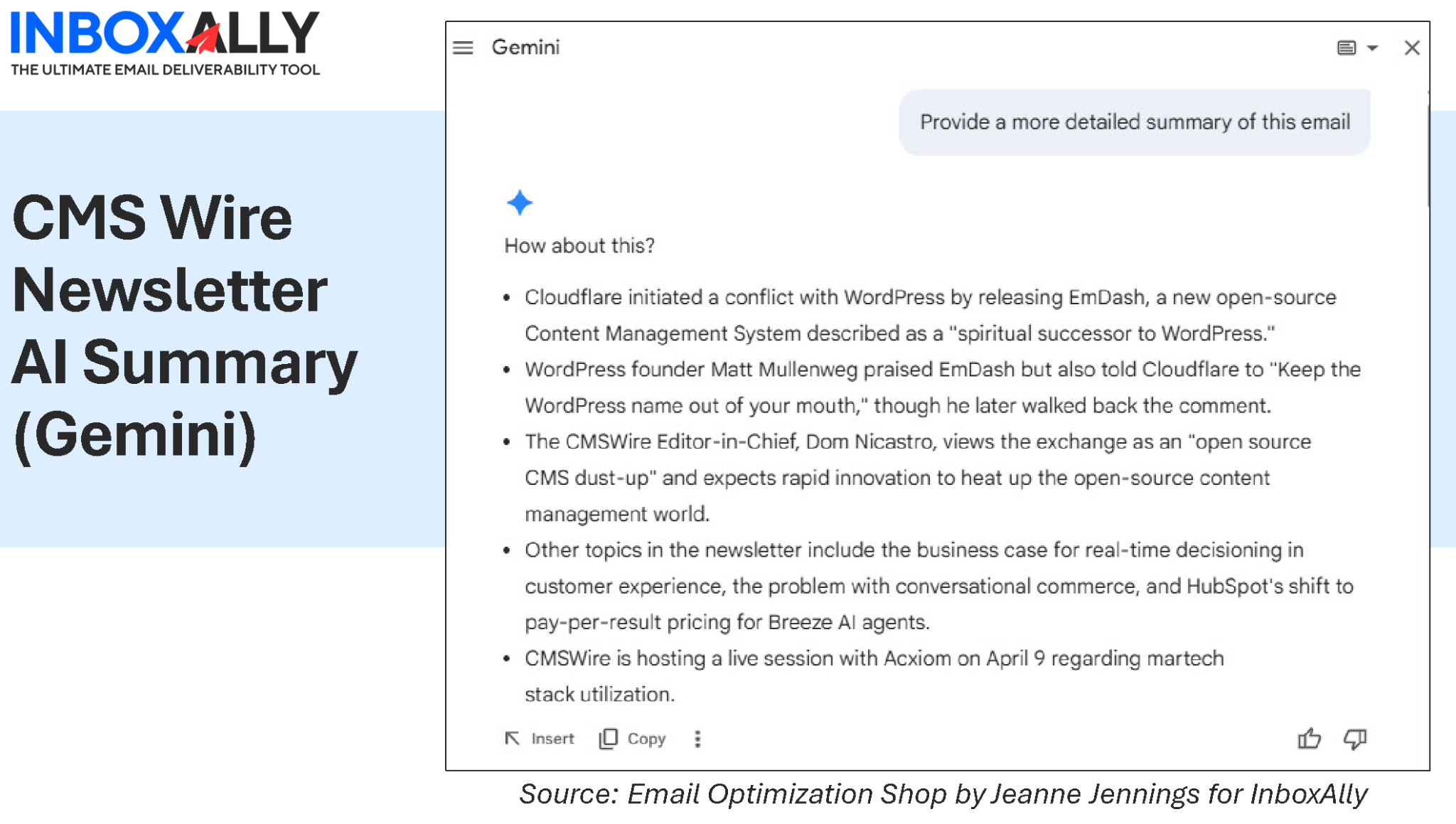
This one was interesting.
The summary included one event mentioned near the bottom of the email
But it missed two events featured higher up
Why?
Those events were primarily presented as images.
And here’s the uncomfortable truth:
If it’s only in an image, it’s optional (or invisible) to AI.
This connects directly back to Jaina’s guidance:
- Use live text
- Don’t rely on visuals alone
What used to be a searchability issue is now a visibility issue in summaries.
And this is where email strategy is evolving. It’s not just about getting delivered, it’s about making sure your content is actually visible and understood. If your key messages aren’t being picked up by AI summaries, they may as well not exist. That’s why improving engagement signals and inbox placement (areas where platforms like InboxAlly focus) is only part of the equation, you also need to structure your content so it can be interpreted correctly.
Example 2A: When AI Fills in the Blanks (Denver Gazette)
View the full Denver Gazette News Alert
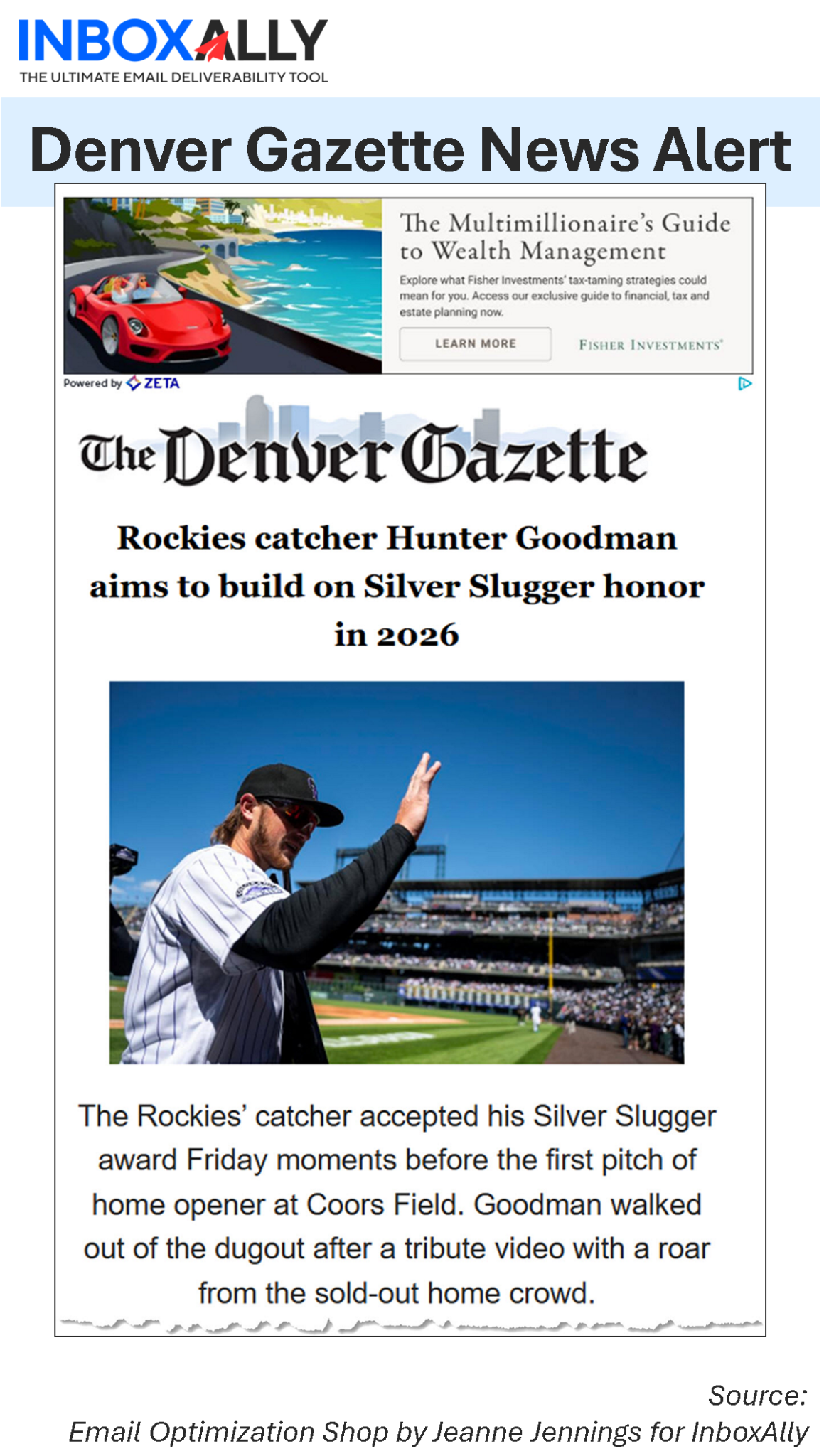
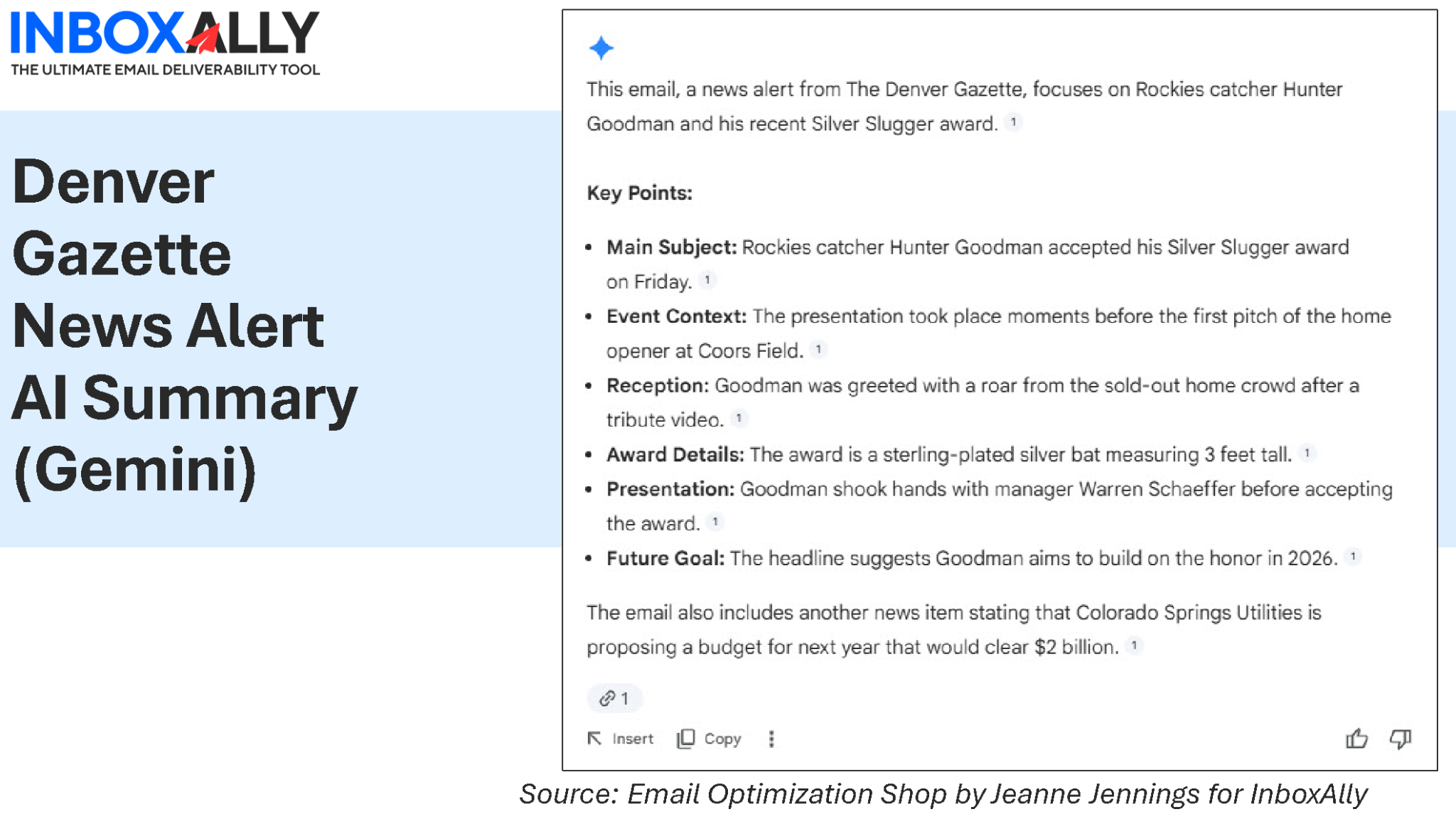
This one looked solid at first.
The Gemini summary captured:
- The main story
- Key details
- Supporting context
Then, at the end, it added something that wasn’t in the email – that blurb about the Colorado Springs Utility budget. It was a pretty short email – and I didn’t see anything about this. (maybe it was in alt text?).
Not wildly wrong. Just… not actually there. A hallucination, if you will.
This is where things get tricky. AI isn’t just summarizing, it’s interpreting.
And if your email:
- Is slightly vague
- Leaves gaps in context
…the model may “complete” the story.
Close enough isn’t always good enough when it’s your brand voice on the line.
Example 2B: A Hidden Casualty: The Ad That Disappeared (Denver Gazette)
There was another detail in the Denver Gazette email that caught my attention.
Actually, what didn’t show up in the summary.
At the top of the email was a display ad. Prominent placement. Clearly paid.
And the AI summary? Didn’t mention it at all.
Not surprising, when you think about it. The ad was:
- Visual
- Separate from the main article content
- Not central to the “story” the AI was extracting
But it raises an interesting question.
If the summary is the first thing a reader sees… and the ad isn’t part of it… what happens to the value of that placement?
This starts to look a lot like what we saw with CMSWire:
- Content in images gets ignored
- Content outside the primary narrative gets deprioritized
Except here, it’s not just a content issue. It’s a revenue issue.
Example 3: When the Format Breaks the Summary (Marketoonist)
View the full Marketoonist Newsletter
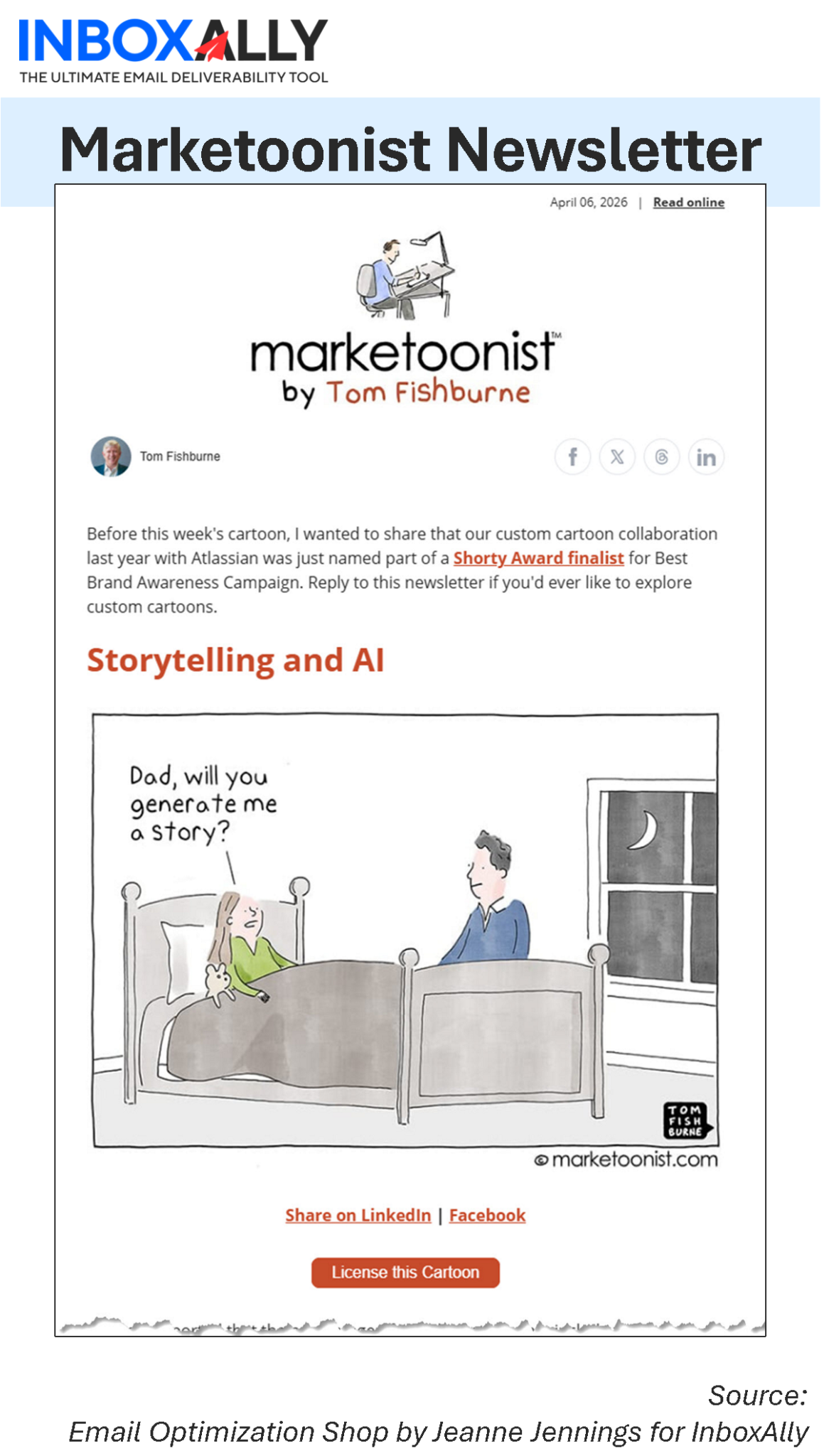
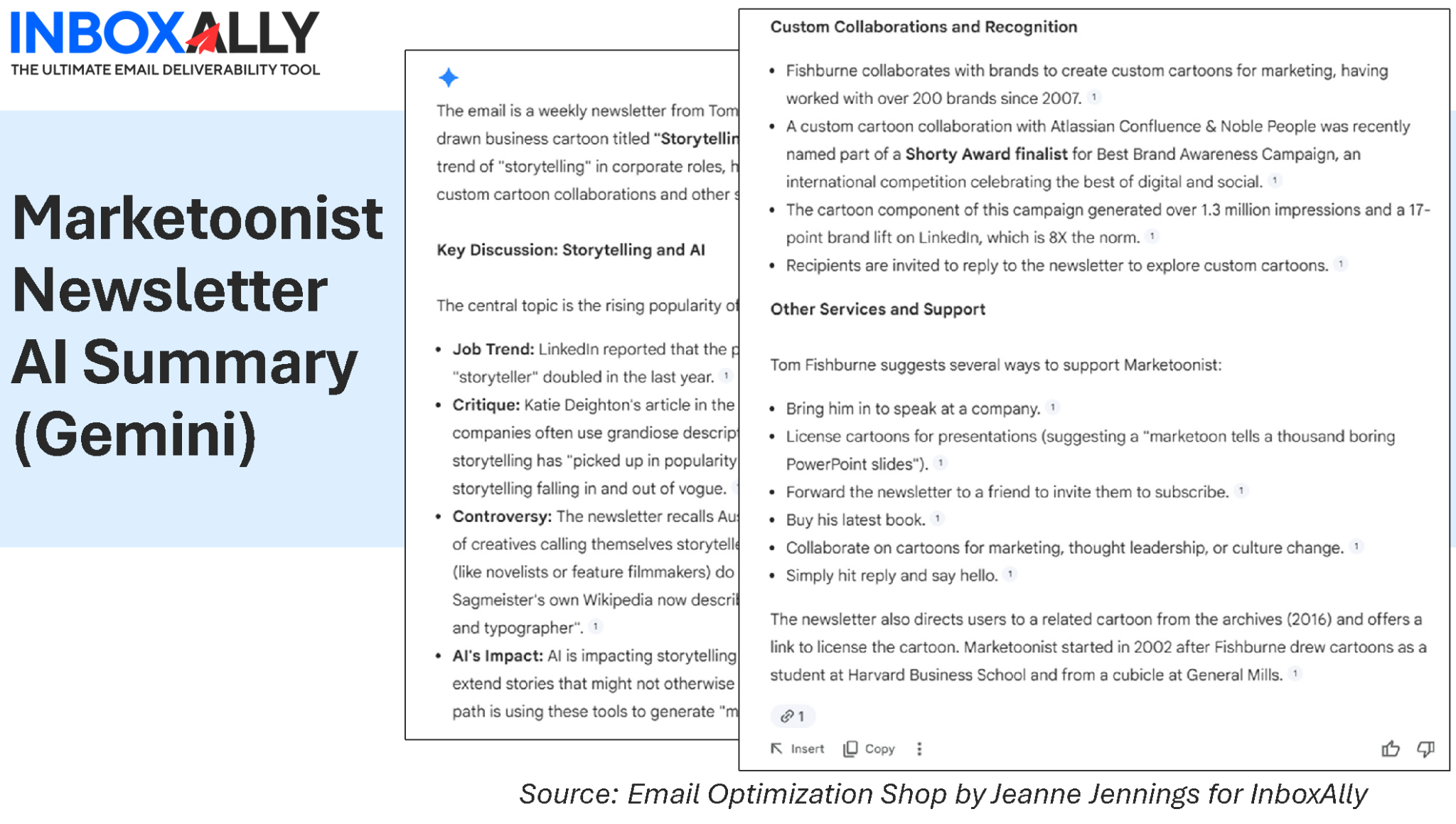
This one hurt a little.
The email is built around:
- Visual cartoons
- Narrative experiences
The summary?
- Extracted the topic (“storytelling and AI”)
- Listed supporting points
- Completely flattened the experience
Because:
AI summarizes information, not experience.
Anything driven by:
- Humor
- Visual storytelling
- Design
…gets reduced to a set of facts.
Which may be accurate, but is far less compelling.
Example 4: When AI Misses the Marketing Point (Email Sender and Provider Coalition)
View the full ESPC Meeting Invite
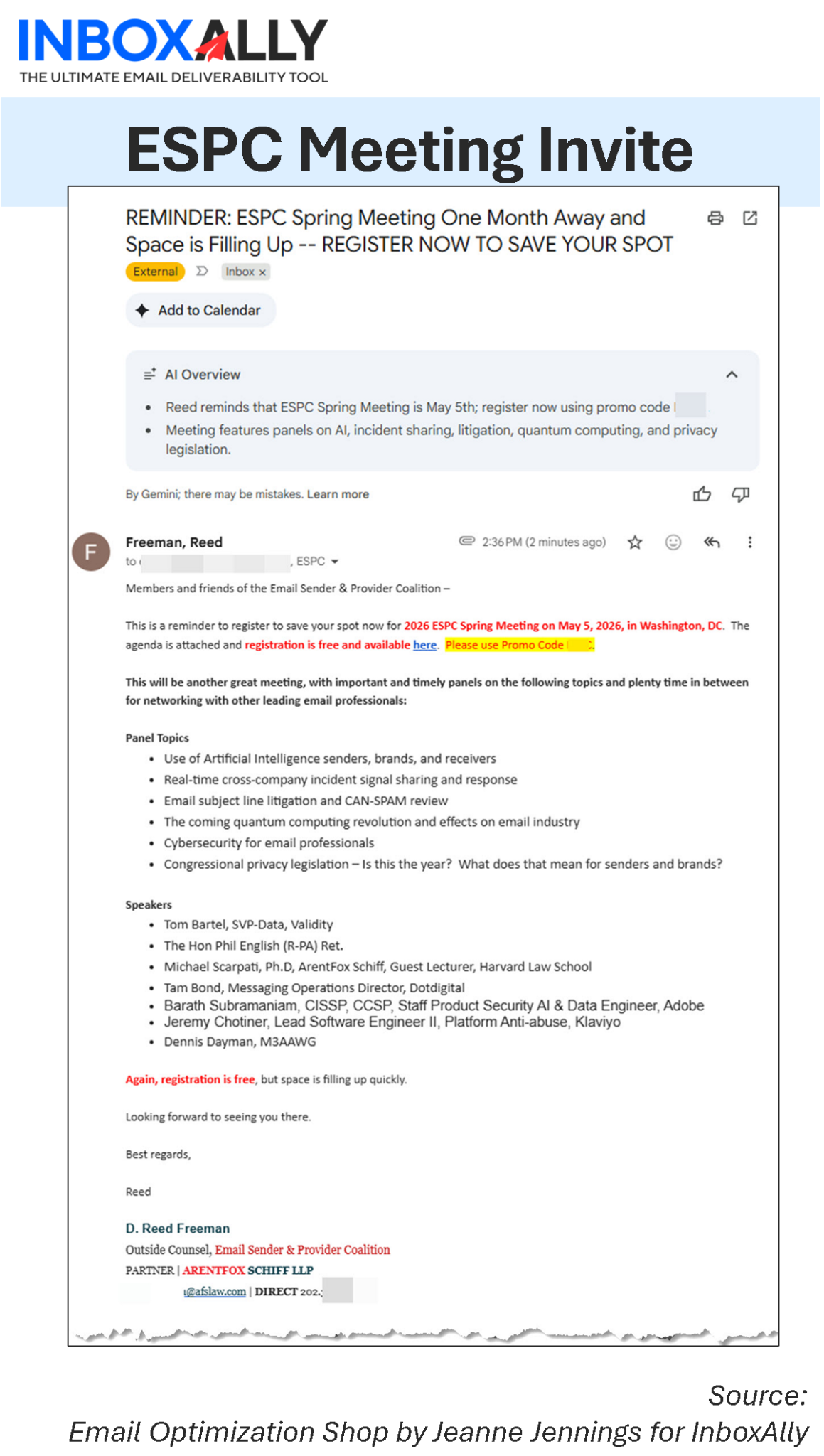
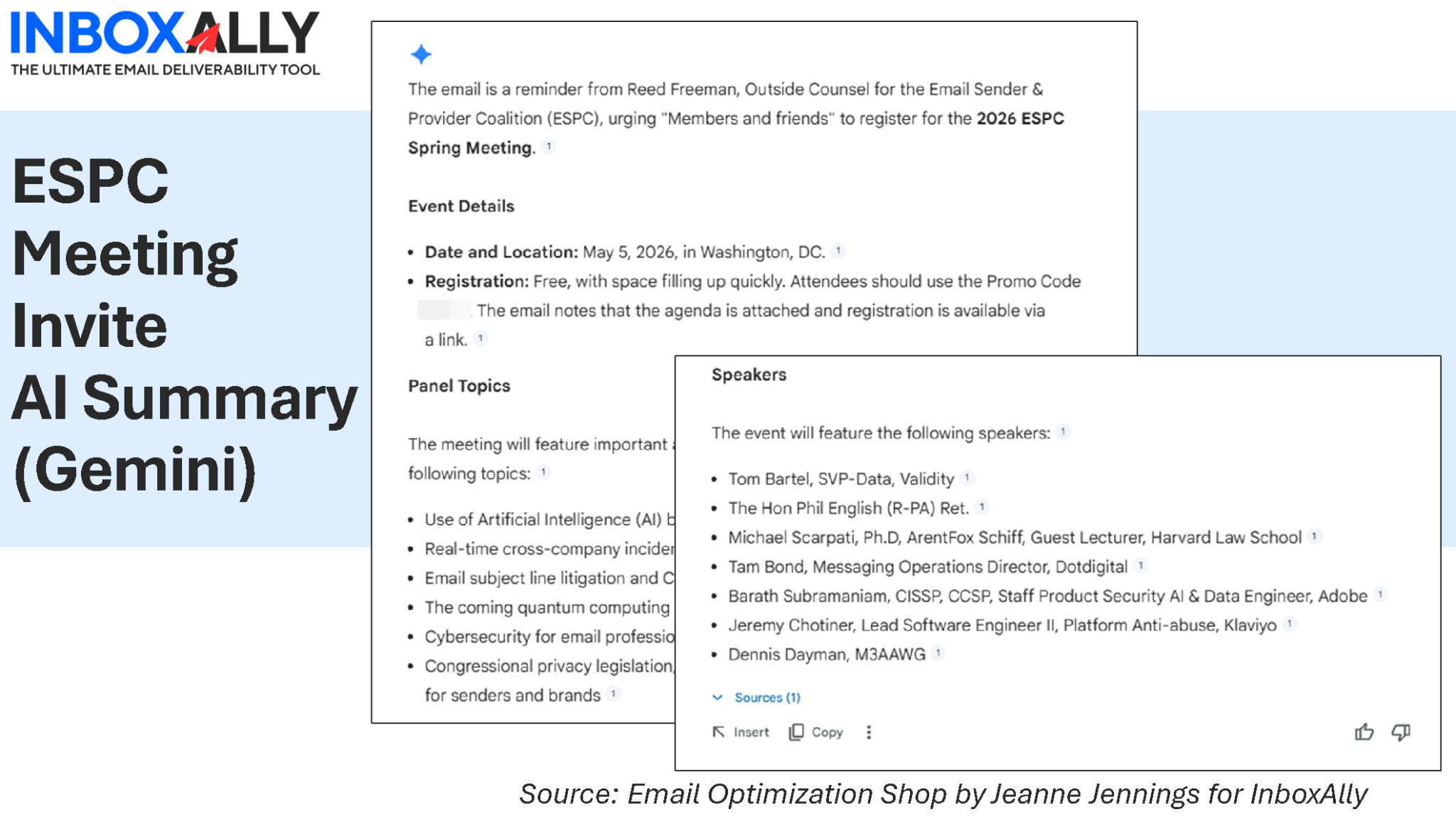
In this case, Gemini included a short, structured summary at the top. It wasn’t bad. But I asked for a more detailed summary anyway.
This one was particularly interesting because the summaries weren’t wrong.
The short one captured basic details, the date and topics.
The longer summary captured:
- The event details
- The full agenda
- The speakers
All accurate.
But both downplayed what the email was actually trying to do:
Get me to register. Now.
The urgency (“space is filling up”) barely registered in either summary.
The call to action? Not emphasized in either.
Which highlights another important shift:
AI is very good at summarizing information.
It’s less reliable at capturing intent.
And in marketing, that’s not a small difference.
This is where things get especially important for marketers. If AI summaries downplay urgency or calls to action, your conversion path starts to break before the email is even read. Improving inbox placement is step one, but ensuring your message survives interpretation is step two. InboxAlly helps strengthen sender reputation and engagement so your emails land where they should. Pair that with clearer, more structured messaging, and you’re much more likely to have your intended message reflected accurately.
Example 5: When It Works (Email Optimization Shop)
View the full Email Optimization Shop (EOS) Newsletter
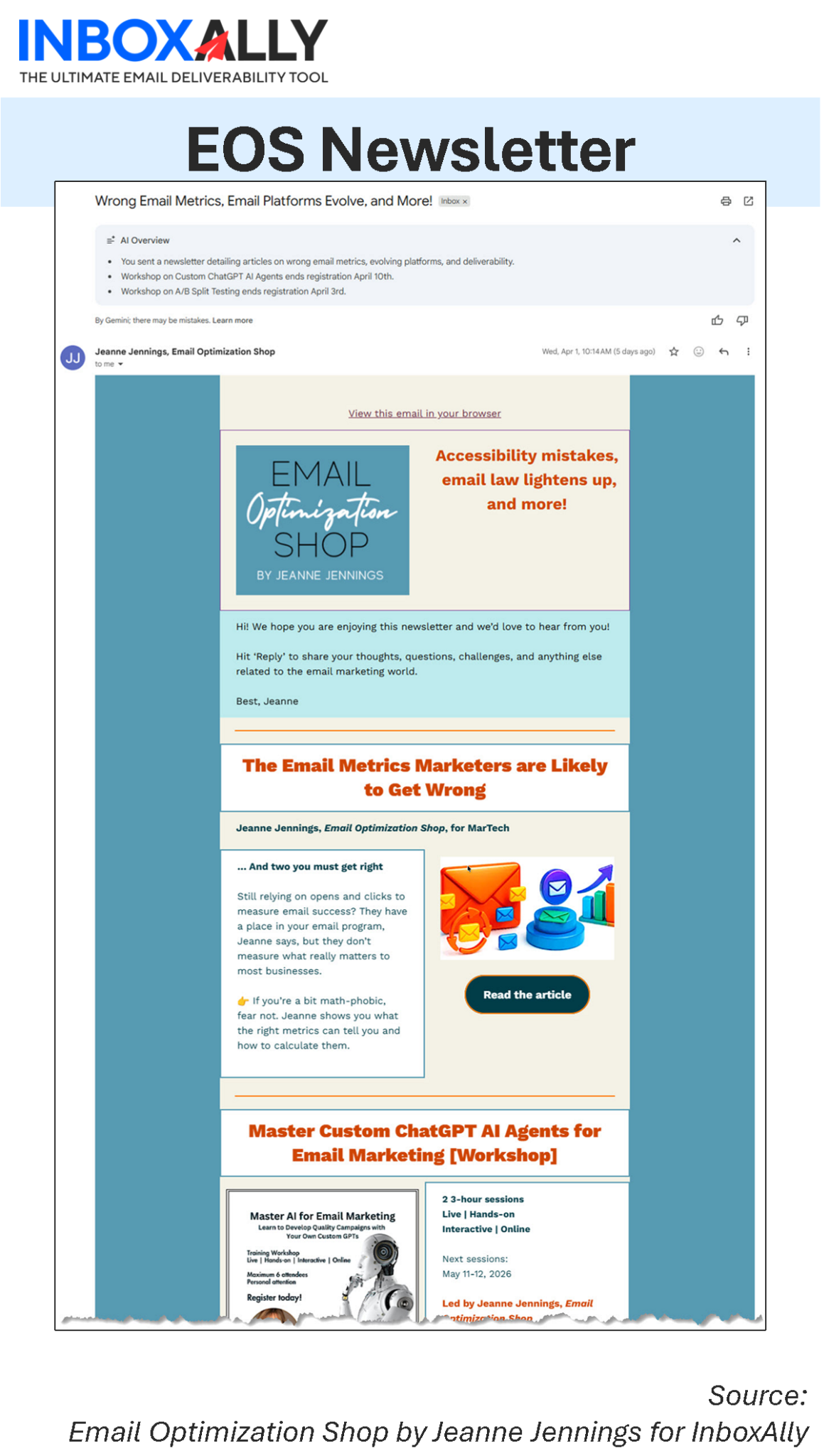
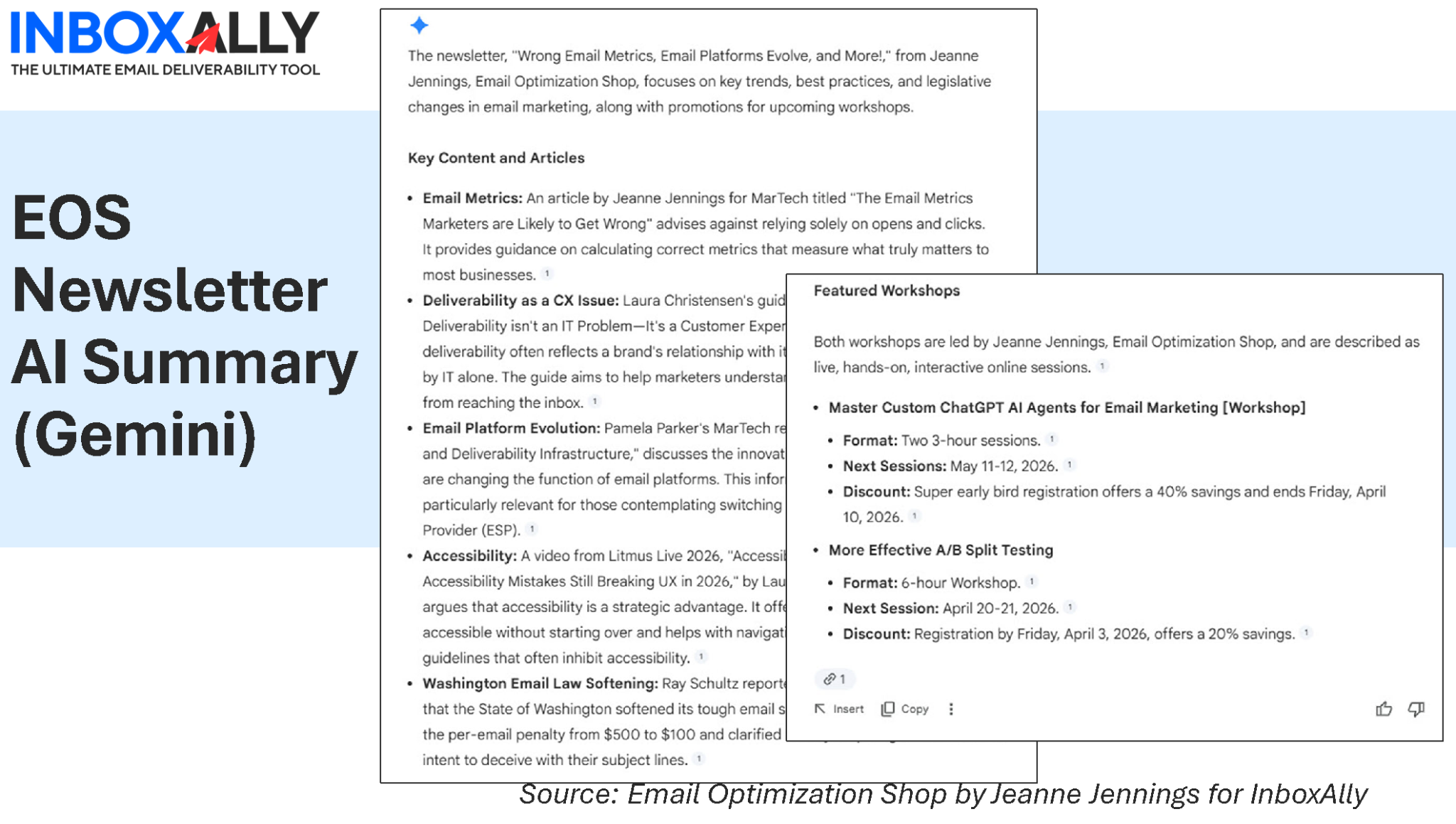
In this case, Gemini once again included a short, structured summary at the top of the message. I asked for a more detailed summary despite this.
The brief summary was… brief. But interesting that it prioritized the workshop offerings over the article content. And while it has registration dates, neither of these is the drop-dead date the summary suggests. They are the dates that the early bird discounts end.
When I asked for a longer summary, Gemini did a solid job:
- Clear topics
- Accurate takeaways
- Logical grouping
More detail on the article content, but the workshops still get a decent amount of space.
Why?
Because the email did something most don’t:
It made the AI’s job easy.
The key points were:
- Written in plain language
- Structured clearly
- Presented early
So the AI didn’t have to infer. It could extract.
(Full disclosure: I was pleasantly surprised at how well my EOS newsletter fared in this experiment.)
What These Examples Tell Us
Across all five emails, a pattern emerges:
AI summaries reward clarity, penalize ambiguity, and ignore what they can’t easily parse.
Or more bluntly:
AI is a very literal reader. It doesn’t “get” your email, it extracts it.
That has implications for how we write.
How to Write Emails for AI Summaries
The goal isn’t to write for AI.
It’s to write so clearly that AI gets it right.
Here’s what that looks like in practice:
1. Lead with your point
If the summary only pulls your first two lines, are you okay with that?
2. Give the email one job
Align to a single stage of the journey. Multiple messages = diluted summaries.
3. Make your CTA unmistakable
Don’t make AI guess what the reader should do.
4. Structure for extraction
Short paragraphs. Logical flow. Clear transitions.
5. Put benefits where they can be seen
Translate features into outcomes early, not halfway down.
6. Don’t hide key content in images
If it matters, it must exist in live text.
7. Use clear, specific language
Vagueness invites interpretation. Specificity reduces it.
8. Remove competing messages
If everything is important, nothing is.
9. Control the narrative early
Don’t leave room for AI to “fill in the blanks.”
10. Think like both a marketer and a model
You’re writing for:
- Your subscriber
- The system summarizing your email for them
Looking for more info on content and creative best practices? Check out Pre-Send Email Marketing Checklist: 15 Things to Do Before You Hit “Send” by Jeanne Jennings, Email Optimization Shop, for InboxAlly. |
|---|
A Simple Test You Can Run Today
Send your next campaign to yourself.
Look at the AI summary.
Then ask:
“If this is all my audience sees… did I do my job?”
If the answer is no, the fix isn’t in the summary.
It’s in the email.
The Bigger Shift
We’re not just optimizing for:
- Opens
- Clicks
- Conversions
We’re optimizing for interpretation.
Jaina’s work helped us make emails searchable. AEO helps us make content extractable.
This is the next step:
Making emails understandable, by machines and humans.
For years, we’ve been asking: “Will they open?”
Now we also need to ask: “What will the AI say about this before they open?”
Want to See How Your Emails Are Being Interpreted?
If you’re not already checking how AI summarizes your emails, now’s a good time to start.
And if your emails aren’t consistently reaching the inbox (or getting the engagement signals they need) that’s worth addressing too.
InboxAlly can help improve inbox placement, sender reputation, and engagement, so your emails have a better chance of being seen and understood.
AI + Client Disclosure I used Gemini to generate and compare the email summaries referenced here, both the inline summaries in Gmail and those generated on demand. The analysis, interpretation, and (occasionally skeptical) reactions are my own. This article was written in collaboration with my custom ChatGPT AI Agent. As always, the perspectives reflect my own independent testing and experience. |
|---|
Jeanne Jennings is a veteran email marketing consultant and strategist with over 20 years of experience. Through her boutique firm Email Optimization Shop, she partners with medium‑to‑enterprise teams in fractional and project roles to audit program performance, design optimization roadmaps, and embed best practices.
She also leads hands-on training workshops, both public and private, to upskill internal teams in email strategy, campaign execution, and use of AI. When she’s not helping clients refine their email programs, you’ll find her programming the Email Innovations Summit, managing the Only Influencers community of email industry professionals, teaching digital marketing at Georgetown University (Hoya Saxa!), or watching hockey (Let’s Go Caps!).
About InboxAlly InboxAlly is a deliverability software platform built to help your emails land in the inbox, not the spam folder. Our tools include real‑time warm-up, engagement signals, seed testing, deliverability diagnostics, and domain/IP reputation repair. All without needing to hand over direct access to your sending infrastructure. Whether you’re launching a new IP/domain, recovering from deliverability issues, or scaling a multi‑sender program, InboxAlly gives you the infrastructure and insights to send with confidence and see measurable improvements in open rates, placement, and sender credibility. View our Plans and Pricing, including our free 10-day trial (no credit card required) |
|---|