
Marketo gives you a powerful toolkit for building campaigns, scoring leads, and automating lifecycle email. But it won’t land those emails in the inbox for you. That part is entirely on your setup, your sending behavior, and, if you’re on a shared IP, a bit of luck with your neighbors.
Average inbox placement among email providers hovers around 83%. For Marketo users sending hundreds of thousands of emails a month, that difference ends up being much more than a rounding error.
In this article we’ll explore what can go wrong with Marketo email deliverability, why most of it is self-inflicted, and what to do about each piece, including the shared IP problem often discovered too late.
Key Takeaways
- Marketo provides the sending infrastructure, but your authentication setup, IP choice, lists, and engagement from them determine whether emails land in the inbox. The platform reports whether emails were accepted by servers, not whether they landed in Primary, Promotions, or Spam.
- The shared IP pool is Marketo’s biggest deliverability wildcard. Other senders’ behavior can ruin a good reputation overnight, and you won’t always know it’s happening until open rates crater.
The “delivered” number is lying to you

Here’s a distinction that confuses even experienced Marketo users: delivery rate and inbox placement are not the same thing.
Marketo reports a delivery rate, which is the percentage of emails accepted by receiving mail servers. A 98% delivery rate sounds great, but “accepted” doesn’t mean “inbox.” That 98% could include 20% or more landing in spam, where nobody’s looking.
Think of it like shipping a package. “Delivered” means the post office took it. Doesn’t mean it reached the doorstep.
The only way to know the actual placement is to track deliverability metrics using seed list testing or tools like Google Postmaster Tools, which show Gmail-specific reputation data for your domain. Microsoft’s SNDS offers similar visibility for Outlook, though it requires dedicated IPs, which rules out a lot of Marketo accounts. We’ll get to why in a moment.
Marketo’s shared IP problem
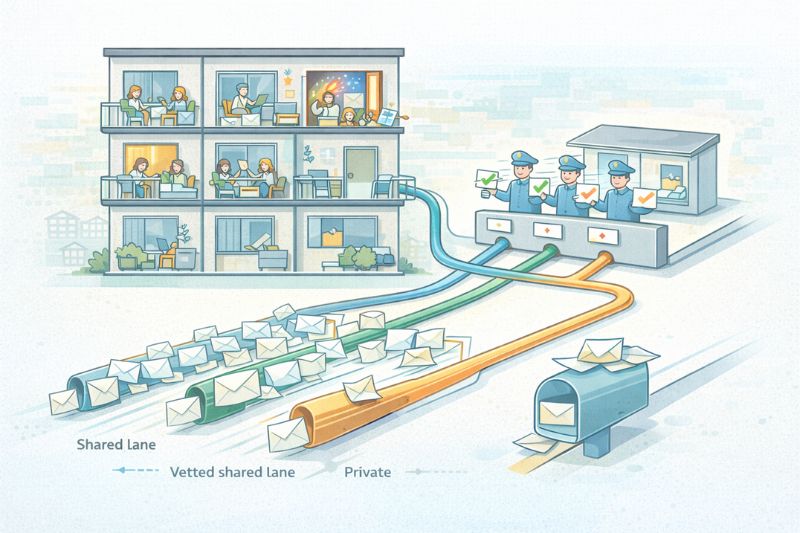
Every Marketo account starts on a shared IP. Your emails leave from the same IP addresses as dozens, sometimes hundreds, of other customers. When everyone behaves well, this works fine. The shared pool has an established reputation, and you can start sending immediately with no warmup.
But shared IPs are apartment buildings. If the neighbor upstairs throws a party and gets the cops called, you’re getting woken up, too.
One independent study tracked blocklist activity across major marketing automation vendors and found Marketo’s shared pool had notably higher blocklist rates than Act-On, HubSpot, and Pardot. Community forums tell similar stories: new customers migrating from other ESPs see delivery rates drop from 99%+ to the low 90s within their first week.
Marketo offers three tiers:
- Shared IPs – default for all accounts. No extra cost, no warmup needed, but also no control over who else is sending from your IP range.
- Trusted IPs – a curated shared pool reserved for senders with good records. You need at least three months on shared IPs with no blacklisting, volume under 75k–100k/month, and no spam complaints. Same cost as shared, but better neighbors.
- Dedicated IPs – your own IP, your own reputation. Full control, but it comes at an additional cost and requires warmup from scratch. Only makes sense if you consistently send 100k+ emails monthly; below that, the IP won’t stay warm enough, and ISPs will treat your sends as suspicious spikes, unless you opt for a warmup service like InboxAlly and get all of it handled for you.
If your open rates dropped after migrating to Marketo and nothing else changed, the shared IP is the first place to look.
Authentication: the thing most marketers half-finish
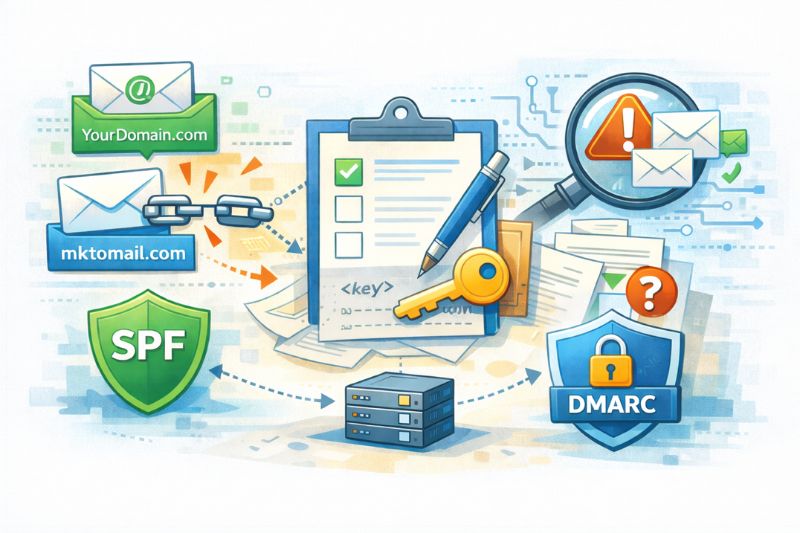
By default, Marketo handles SPF authentication for its own domain, mktomail.com, which means your emails pass the SPF check. But they won’t pass SPF alignment, because the authenticated domain (mktomail.com) doesn’t match your From address domain.
The fix is simple but commonly missed: set up custom DKIM signing for your actual sending domain. That gives you both DKIM authentication and DKIM alignment, which satisfies Gmail and Yahoo’s requirements even without SPF alignment. Marketo’s admin panel lets you generate the DKIM key, but you still need to publish the DNS record yourself, and that usually means coordinating with whoever manages your domain.
DMARC is the final step. Adobe recommends a gradual rollout: start at p=none (monitoring only), confirm legitimate emails are passing, then escalate to p=quarantine, and eventually p=reject. Jumping straight to reject before verification will bounce your own mail.
A common pattern among Marketo teams: SPF is configured, DKIM is half-set up (the key was generated but never published in DNS), and DMARC doesn’t exist at all. That’s enough to pass basic checks most of the time, until a mailbox provider tightens enforcement and your inbox rate drops 15 points overnight.
The importance of list hygiene

Marketo gives you tools for this. Smart Lists can filter contacts who’ve gone dark: no opens in 90 days, recurring soft bounces, invalid addresses. The platform also auto-unsubscribes recipients who file spam complaints through ISP feedback loops.
But the tools only work if you use them aggressively enough to improve deliverability.
Marketo’s own documentation recommends building a smart campaign that marks subscribers’ email invalid after three soft bounces within 60 days. That’s stricter than the default threshold, and it’ll shrink your sendable list. Good. A smaller, cleaner list with good email engagement will always outperform a bloated one that drags your sender reputation through the mud.
The other half is engagement filtering. ISPs aren’t just tracking bounce rates; they’re scoring you on opens, clicks, replies, and scroll depth. If a large chunk of your list ignores you consistently, that disengagement becomes a hint that your mail isn’t wanted.
Segment aggressively, send your best email content to the most engaged contacts first, let those sends build your reputation, then expand to cooler segments. Same principle as IP warmup, applied to your audience instead of your infrastructure.
Deliverability metrics: what to watch and when to worry
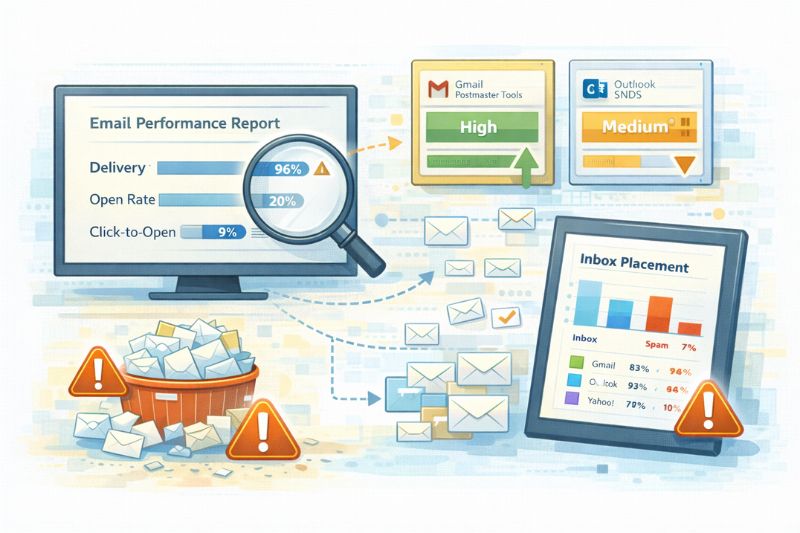
Marketo’s Email Performance Report is your starting point. Scope it to the last 90 days and look for campaigns with metrics that deviate sharply from your average. Those outliers point to specific problems.
Benchmarks to keep in mind: aim for 98–99% delivery rate (below 95% means something structural is faulty). Open rates over 20% are a good target, though bot activity and Apple Mail Privacy Protection inflate that number. Click-to-open rate over 15% means there’s genuine engagement.
But remember the blind spot from earlier: Marketo can’t tell you inbox vs. spam placement. For that, you need external tools.
Google Postmaster Tools is free and shows domain reputation, spam rate, and authentication results for Gmail. A sudden drop from “High” to “Medium” reputation calls for further investigation. Microsoft SNDS provides similar data for Outlook, but requires dedicated IPs.
If you’ve purchased Marketo’s optional Deliverability Tools add-on, the Inbox Tracker uses seed lists to approximate inbox placement rates between providers. It’s the closest you’ll get to knowing where emails land.
Don’t ignore engagement

Everything we’ve discussed above keeps you from getting blocked. But staying out of spam is different from staying in the inbox.
Mailbox providers value engagement when deciding placement. Opens and click-through rates are the basics, but the biggest affectors require actual human effort, like replies, moving an email out of spam, dragging it from Promotions to Primary, and marking it as important.
This activity teaches inbox providers that your mail is wanted, and it’s hard to generate at scale through content alone, no matter how good it is.
If inbox providers are the gateway, you don’t just “optimize” your way through poor deliverability. InboxAlly generates the engagement actions that providers treat as proof that your emails are worth your audience’s time. Start a free trial and see how your email campaigns perform when inbox placement isn’t a bottleneck.
Putting it together
Marketo email deliverability is a stack of interlocking systems, and a weakness in any part of it compounds the others. A misconfigured DKIM record on a shared IP with a stale list is four problems at once, and each one makes the others worse.
Luckily, the fix follows a predictable sequence:
- Authenticate first (fully, not “almost”)
- Evaluate your IP situation
- Clean your list hard, then keep it that way
- Monitor inbox placement
- Build the kind of engagement that mailbox providers reward
Getting there means treating deliverability as a fundamental part of your email marketing strategy, not an afterthought. Everything else you build in Marketo depends on it.