
When your email accidentally lands in the Primary inbox, it is generally an indication that your technical setup or engagement signals are triggering Google’s highest level of trust. Although most email marketers aim for this placement, seeing promotional emails avoid the expected filters can lead to confusion related to brand authority and recipient privacy.
This change often happens when the automated sorting system has stopped seeing your campaign as a bulk broadcast. In this guide, we will explain the specifics that can cause these shifts in Inbox placement and how you can maintain your visibility for Gmail users.
Quick Answer
Generally, emails are sent to the primary tab when Google recognizes them for having a high engagement level and lacking conventional promotional content markers. This occurs when your sender reputation and email content closely resemble a personal message rather than a mass marketing blast.
Gmail Users Influence Primary Inbox Placement
Your emails go to the Primary tab when recipients consistently engage with them like personal messages. Google prioritizes the user experience by using various factors related to how subscribers interact with your mail to categorize where future emails belong.
Engagement Signals and Inbox Placement
When recipients interact with your messages, they send a direct signal to their email service provider that the content is important. High open rates are a start, but the Google filter looks for deeper signs of a relationship. If a person replies to your marketing emails, it strongly suggests the sender is a known contact. This often results in future messages bypassing the promotions folder entirely.
The “User Feedback Loop” is another factor where consistent interaction retains the inbox tab for every send. If many Gmail accounts manually move your thread from the promotions tab to the primary folder, the filter takes note. This manual action is the most powerful way to improve deliverability for your specific address.
- Reply rates: The strongest signal for primary placement.
- Manual moves: Moving mail out of other tabs.
- Starring: Marking messages as important emails.
The Role of Sender Reputation
When you have a high sender reputation, it encourages Google to see your domain as a trustworthy source for important messages. If you have a history of high engagement and low span complaints, your emails end up in the primary feed more often. This is particularly true for individuals who don’t send promotional emails at a massive scale, which keeps your volume looking “human.”
A powerful sender score can help avoid the common deliverability issues in email marketing. When your domain has a clean record, Google is more likely to trust that your content belongs in the main folder. Keeping a clean contact list and avoiding spam triggers keeps this reputation solid over time.
Email Content Triggers Affect the Primary Tab
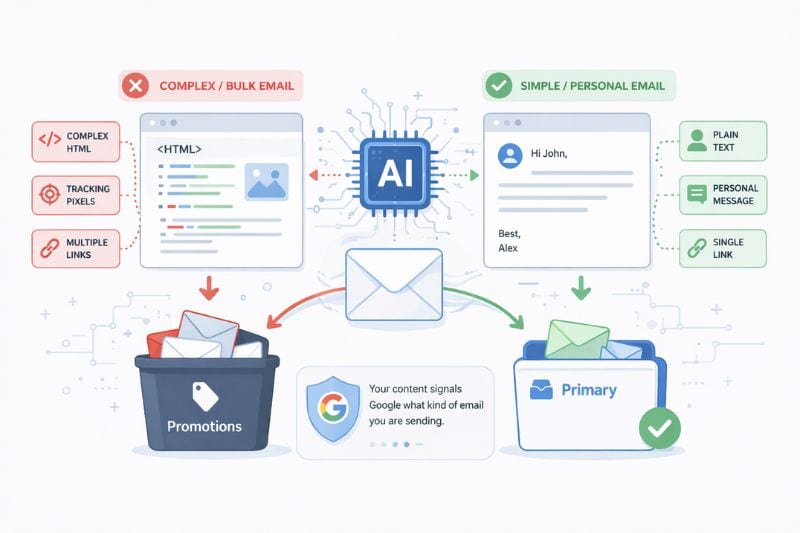
Your email content triggers the primary tab placement when it lacks the complex HTML and tracking code common in bulk emails. The way you build your messages can either hide your marketing intent or signal to Google that you are sending a one-to-one note.
Simplifying Formatting for the Primary Inbox
Heavy marketing emails often use a high image-to-text ratio, which is a major flag for the promotions folder. By using less HTML and focusing on text, your mail can act like a real person sending a note to a friend. These personalized notes are far more likely to land in the primary tab because they lack the complex code found in traditional promotional messages.
Similarly, avoid using too many deals or flashy banners, as these spotlight the emails as promotional messages. In short, the simpler your emails look, the more chances you have of staying out of other tabs and keeping your open rates high.
Want to see how Gmail categorizes your current templates? Use the Free Email Tester to check your inbox placement and find out where your messages are landing.
Understanding Metadata and Hidden Headers
The behind-the-scenes code of your emails also affects the way Google categorizes your messages. Even if the email content looks like a personal note, these hidden characteristics like “Precedence: bulk” or “List-Unsubscribe” cue that you are sending promotional emails.
When these headers are absent or customized, Google’s tab-based filtering may default to the primary folder. This is standard practice with small-scale bulk emails sent through personal Gmail accounts or local servers. Without the conventional signatures of a major email service provider, the filter assumes the mail is a private person-to-person conversation thread.
Avoiding Typical Promotional Content Flags
The subject line is the first technical signal Google uses to determine where emails land. If it contains words like “Free,” “Discount,” or “Off,” the promotions tab is the likely destination. Even the welcome email can be diverted if it is too heavy on promotional content right from the start.
Another key factor is the address you use to send emails. Using a personal name in the “From” field instead of a generic company address can change how Gmail sees the messages. Furthermore, the presence of a clearly visible “Unsubscribe” link is a technical signal that the message is part of a bulk list and not a private person-to-person conversation thread.
Proper List Management Prevents Deliverability Issues

Clean data helps in making sure that your emails end up in the right folder, which can be achieved by maintaining a list of actually engaged subscribers. With a high-quality list, the resulting high engagement signals prevent deliverability issues that can lead to spam folders.
Implementing Double Opt-In for Quality Control
To maintain a healthy contact list, using a double opt-in is necessary. It’s a procedure that helps acknowledge that the person on the other side actually wants to receive your notifications. It also allows you to filter out bots and fake Gmail accounts that would otherwise hurt your email engagement metrics.
A clean list reduces spam complaints and makes sure that your important messages are not being sent to dead inboxes. With this focus on quality over quantity, successful email marketers can manage their deliverability over the long term. When every person on your list is active, your emails land in the right place.
Monitoring Where Emails End Up
The best way to make sure your strategy corresponds well with your goals is to regularly check how different Gmail inbox tabs are handling your campaigns. With a seed list, you can see if your marketing emails are staying in the primary feed or slipping into the promotional folder. If you start noticing a sudden drop in the open rates, it might be a sign that your sender reputation has shifted for Google.
- Monitor placement: Inspect if emails end up in the spam folder.
- Test templates: See how different subject line choices affect the tab.
- Track complaints: Keep an eye on how many users hit the spam button.
Technical Authentication Secures Your Inbox Placement

Proper technical authentication helps in proving your identity to Gmail users and makes sure that your inbox placement stays stable. If you are not working with these foundations, your messages might start to flag as suspicious and cause them to completely miss the primary tab.
Verifying Domain Identity
For a proper baseline for email deliverability, you will need to set up SPF, DKIM, and DMARC. These records tell the email service provider that you are actually who you are. Once Google verifies the sender, it is more likely to categorize the message as safe. This is an important step to improve deliverability and avoid being blocked by Google servers.
If your technical settings are wrong, even the most relevant and personalized content won’t be able to save you. In short, authentication works as your digital passport and allows your email to travel through the different filters to reach the recipients without being flagged as a threat.
Switching Between Gmail Inbox Tabs
To switch between Gmail’s inbox tabs, you will need to strategically warm up your sending domain. You have to start by mailing your most engaged subscribers first. After some time, the Google algorithm will learn that the emails from your domain are important enough to be sent directly to the main folder.
InboxAlly provides a proactive way to fix these tab-based issues by automating the engagement process. Instead of waiting for subscribers to create filter rules or deselect promotions, the tool trains the filter to see your mail as important. This ensures your promotional emails stay visible where they get the most comments and clicks.
Balancing Your Primary Tab Strategy

Being able to handle where your messages land needs a balance of clean email content and powerful technical health. Although getting into the primary folder does improve your visibility, you will still need to make sure that your content stays relevant to your users to avoid being labeled as spam. With a focus on a clean contact list and authenticated sending, you can manage your inbox placement with confidence.
Start your 10-day Free Trial with InboxAlly today and improve your email deliverability with better control over inbox placement.