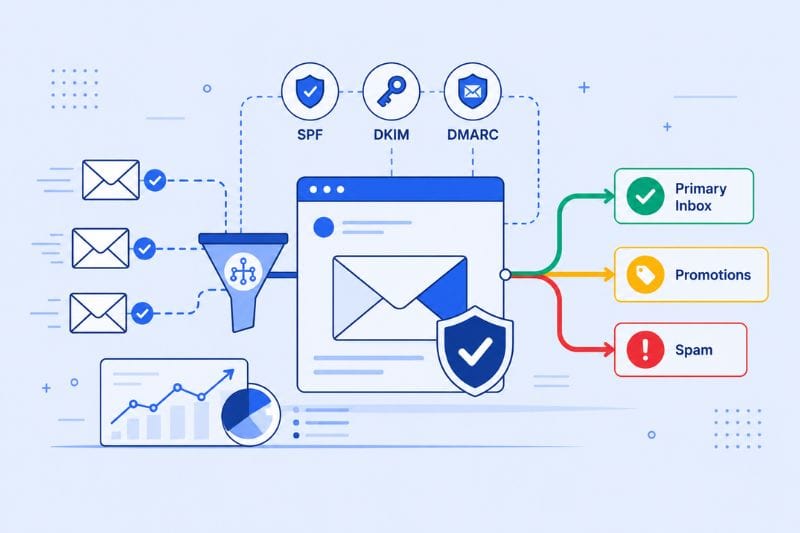
As we look toward 2026, one thing is clear: the landscape of email deliverability is changing at a rapid pace. Filters are evolving, engagement thresholds are tighter, and inbox providers are using smarter technology to decide what deserves a place in the inbox.
If your open rates have slipped lately or your campaigns are ending up in promotions instead of primary, you’re not alone. The same tactics that worked a year ago just don’t pass the test anymore.
In this article, we’ll unpack the biggest shifts happening right now, what to expect in the months ahead, and the best ways to stay ahead of Gmail, Yahoo, and Outlook’s new rules.
Key takeaways
- The best practices for email deliverability in 2026 are authentication (SPF, DKIM, DMARC), consistent list hygiene, and measurable recipient engagement, in that order of foundational importance.
- Inbox placement now depends more on real-time recipient behavior, such as opens, replies, and deletions, than on message content alone.
- Senders who continuously monitor placement and adjust before a drop, rather than after, will maintain the strongest inbox access through 2026.
What Is Email Deliverability?
Email deliverability is the ability of an email to reach a recipient inbox, rather than being filtered to spam, blocked outright, or routed to a promotions tab. It differs from email delivery, which simply measures whether a mailbox provider accepted the message technically. A message can be delivered and still never reach the inbox.
The Foundations That Still Apply in 2026
Before getting into what’s changed, let’s ground the rest of this guide in what hasn’t. The fundamentals of deliverability like authentication, list hygiene, sender reputation, and engagement benchmarks still determine whether your mail reaches the inbox, and every trend covered below works as an addition to these foundations.
Authentication comes first. SPF (Sender Policy Framework), DKIM (DomainKeys Identified Mail), and DMARC (Domain based Message Authentication, Reporting, and Conformance) are now mandatory for bulk senders who send to Google, Yahoo, and Microsoft. A January 2025 Validity study found 84% of sending domains still have no published DMARC record. If yours is one of them, fix that before anything else on this page.
List hygiene is non-negotiable. Repeatedly sending to inactive or invalid addresses shows to providers that you don’t maintain your list. Hard bounce rates above 2% trigger ESP suspensions, which makes the safer target below 0.5%. Suppress contacts who haven’t engaged in 90–180 days, ideally after a re-engagement attempt.
Open rates above 33% are the working baseline in most industries. Spam complaint rates need to stay below 0.1%, as anything higher than that Google’s bulk sender requirements consider you non-compliant. Unsubscribe rates above 0.3% indicate either targeting problems or sending frequency the audience didn’t sign up for.
Quick reference:
| Metric | Threshold to Watch |
|---|---|
| Hard bounce rate | Under 2% (target under 0.5%) |
| Spam complaint rate | Under 0.1% |
| Unsubscribe rate | Under 0.3% |
IP and domain reputation operate together. Domain reputation is portable across IPs and ESPs; IP reputation is tied to the specific server you send from. A good domain can cushion a new IP through warm-up, but a poor IP will eventually drag a healthy domain down. Both need attention.
Everything that you’ll read in the rest of this article assumes these are in place. If they’re not, the new patterns of 2026 won’t matter much and your placement will already be capped by the basics. For the full breakdown of everything that keeps mail out of the spam folder, see our complete deliverability guide.
1. The Rise of AI-Driven Filtering
The most consequential change going into 2026 is how inbox filters use machine learning to evaluate sending behavior in near real time. Gmail and Yahoo have moved well past keyword-based spam rules. Spam filters now track how recipients interact with your mail over multiple sends and adjust placement decisions based on the pattern that emerges. The metrics include open speed, scroll behavior, click rate, replies, deletions, movement between folders, and a few more.
These signals add up when recipients engage actively, and providers progressively route more of your mail to primary placement. When recipients consistently delete without opening or mark as spam, the same logic works against you, and the reputation damage becomes more prominent. Eventually, drops that used to take weeks to register are now obvious within days.
What to expect in 2026
Micro-engagement signals (how quickly someone opens, whether they scroll to the end, whether they rescue mail from spam) are increasingly weighted more heavily than aggregate volume history. Spam filters are treating recent behavior as a better predictor than long-term sending patterns. Reputation recovery after a drop also takes longer since providers want sustained evidence of improvement before recalibrating.
What you can do
Segment your list by engagement and reduce frequency to contacts who’ve gone quiet. Keep subject lines specific rather than promotional, messages tightly focused, and templates lightweight. Simple, text-forward designs almost always outperform image-heavy layouts under behavioral filters. For more on this, see our guide to email content practices that support deliverability.
If your domain or IP reputation has already been damaged and engagement isn’t recovering on its own, try InboxAlly, which generates the exact recipient behaviors providers are watching to rebuild the engagement history filters use to make placement decisions.
2. Authentication Is Now Mandatory
Google and Yahoo mandated SPF, DKIM, and DMARC for high-volume senders in February 2024. Microsoft followed in May 2025, requiring the same for any domain sending more than 5,000 emails per day to Outlook, Hotmail, and Live addresses, with non-compliant mail going to Junk immediately and full rejection planned for a later enforcement phase.
Authentication is the baseline cost of access in 2026, not a recommendation as it once was. What’s getting more strict from here is alignment and validation depth: mailbox providers are looking past whether the records exist to whether they’re correctly configured, properly aligned on all subdomains, and consistently passing checks.
What’s new this year
Gmail is flagging messages with incomplete alignment between the visible “From” address and the DKIM signing domain. Yahoo is expanding enforcement to smaller-volume senders that were previously below the threshold. Some ESPs have started blocking unverified sending domains at the platform level to protect their own shared infrastructure.
What you can do right now
- Confirm SPF, DKIM, and DMARC are in place and aligned, not just published.
- Monitor your DMARC aggregate reports monthly. They’ll point out unauthorized sending and misalignment issues before providers do. If you send from multiple subdomains or IPs, every sender needs its own authentication record.
- Review DNS quarterly to catch expired DKIM keys or stale SPF entries.
A January 2025 Validity study found that 84% of domains used in email “From” addresses still have no published DMARC record. The bar for compliance is low, but most senders still aren’t clearing it. If you’re in that group, fixing it is the single highest-leverage change available to you right now.
3. Engagement Takes Center Stage
Reputation in 2026 changes much faster than most sending workflows are built for. A single poorly targeted campaign can move your placement noticeably within 48 hours, and the recovery curve afterward is slower than the drop. If you want to maintain consistent placement in 2026, make sure to catch these problems before they become a fundamental issue.
What’s changing
Reputation recalculations are running daily for most senders and effectively continuous for high-volume programs. A few bad sends in succession can trigger a measurable downgrade. Manual monthly audits aren’t quick enough to keep up, so keep that in mind.
How to adapt
Check Google Postmaster Tools and Microsoft SNDS weekly at minimum (check them daily during high-volume periods). If placement drops, isolate the cause within a day or two: a new list segment, a template change, a low-performing campaign, an unusual volume spike. The faster you identify the trigger, the smaller the reputation damage tends to be.
How to Read Your Google Postmaster Tools Dashboard
Checking Postmaster Tools weekly only helps if you know what the graphs are actually telling you.
Reputation bands to watch
Domain and IP reputation each show as one of four color-coded bands: Bad, Low, Medium, or High. A drop from High to Medium after one bad campaign is normal noise. A slide into Low or Bad, or a band that keeps falling over several days, is the signal worth acting on immediately.
Spam rate thresholds
Spam rate is the graph to watch most closely. Google marks two threshold lines directly on the chart: 0.10 percent is the healthy ceiling to stay under, and 0.30 percent is the policy limit where Google treats a breach as a sender reputation incident, not just a bad day.
Two separate views
IP reputation and domain reputation are shown separately, and they should be read that way. A new sending IP can carry a weak reputation while the domain behind it stays healthy, or the other way around. A problem in one does not always mean a problem in the other.
Feedback loops by domain
If you send from more than one domain or subdomain, check feedback loop status for each one individually. A single shared view can hide a problem that is isolated to just one sender.
4. Smaller Lists, Higher Quality
The “send to everyone” strategy is officially over.
Mailbox providers are now prioritizing engagement ratio over total send volume. In other words, 1,000 engaged subscribers beat 10,000 passive ones every time.
New in 2026
- Providers may automatically deprioritize inactive segments within your list.
- Some ESPs are rolling out automated list-cleaning recommendations based on engagement data.
- Low-quality lists can now trigger rate limits or slow delivery.
How to stay ahead
Audit your list regularly. Remove or re-engage anyone who hasn’t interacted in 6–9 months.And keep bounce rates under 2% and spam complaints below 0.1%.
When possible, collect new subscribers with double opt-in; it’s becoming the gold standard for compliance and reputation.
5. Privacy and Compliance Become Deliverability Factors
Privacy rules aren’t just legal guidelines anymore; they’re being baked into deliverability scoring. Mailbox providers are measuring whether senders follow permission-based practices, provide easy opt-outs, and honor unsubscribe requests quickly.
What’s coming in 2026
- Expect mailbox filters to include “user trust” signals such as unsubscribe speed, consent verification, and complaint handling.
- Regional privacy laws (like Canada’s CPPA and new EU updates) will influence global sender standards.
What you can do right now
Take a moment to check your consent logs and privacy notices.
Every email should include a one-click unsubscribe option, and your signup forms should clearly record explicit consent, as mailbox providers like Gmail and Yahoo will factor complaint rates into their trust in a sender.
6. AI Tools Replace Manual Deliverability Audits
The same machine learning shift that changed how inboxes filter mail is also changing how senders manage deliverability. Monthly audits and manual placement checks can’t keep pace with reputation systems that recalculate daily. The tools senders rely on are relying more and more on continuous monitoring, predictive flagging, and pre-send risk analysis.
How all of this works in 2026
Deliverability platforms now monitor engagement signals, sender reputation, and inbox placement on a rolling basis rather than at fixed intervals. Predictive models mark campaigns likely to underperform before they’re sent, based on subject line patterns, content structure, and segment behavior. This is good news because it allows pre-send testing to become a default step in most email programs.
The functional change is the more important one, though. The senders maintaining the strongest placement in 2026 aren’t reacting to problems after they appear in open rates but catching issues that precede placement drops and adjusting before the next send goes out. For a closer look at what these platforms actually do, see our roundup of the best deliverability tools.
7. Engagement Becomes the Ultimate Score
By the end of 2026, engagement will be the single most powerful factor in inbox placement.Mailbox algorithms are evolving to evaluate not just if people open your emails, but how they interact afterward. Do they click, forward, or reply?
The new rules of engagement
- Engagement from new subscribers counts more heavily than from long-term ones.
- Repeatedly sending to unresponsive contacts will drag down your domain reputation.
- Personalization, relevance, and timing all carry more weight than ever before.
How to win
- Try running a few A/B tests to see when your audience actually opens your emails.
- Send content that’s useful right away, not just nice to read.
- Stick to one main point per email so your message is easy to follow.
- Every time someone clicks or replies, it tells the algorithm your emails deserve a place in the inbox. That’s what builds trust in 2026.
8. Inbox Placement vs. Promotions: The New Gray Area
As inbox filters evolve, getting out of the spam folder is no longer the only challenge. In 2026, the real battleground is the promotions tab. Gmail’s machine learning systems now classify messages not just by technical setup or sender reputation but also by intent and engagement patterns.
Even well-authenticated senders with clean reputations are finding their campaigns consistently landing in promotions. This does not always mean your emails are failing; it simply means the algorithm believes they are primarily commercial or repetitive in nature.
What’s changing
- Gmail’s classifiers now factor in content structure, frequency, and offer-heavy wording when assigning placement.
- Repetitive campaign formats, identical templates, or overused CTAs can increase the likelihood of being filtered into promotions.
- Reply rates and conversation-style engagement are becoming stronger signals of primary placement.
Why it matters
Being stuck in promotions does not necessarily kill deliverability, but it can lower visibility and engagement. Many users ignore that tab entirely, which can indirectly affect your sender reputation over time. Consistent promotion placement also limits how your campaigns perform in Gmail’s predictive inbox algorithm.
How to adapt
- Mix up your campaign types and send educational, story-driven, or insight-based emails between sales offers.
- Encourage natural engagement by asking questions or requesting feedback from subscribers.
- Avoid using too many promotional phrases or heavy imagery; a conversational tone often performs better.
- Monitor your placement using tools like InboxAlly to understand where your messages land and adjust your content accordingly.
The promotions tab is not the end of the world, but in 2026, it is becoming a key differentiator between good and great deliverability. Balancing commercial intent with authentic, relationship-focused content is what will keep you visible in the primary inbox.
Quick Email Deliverability Checklist
Use this as a fast recap of everything above. For the full step-by-step version, see our email deliverability checklist.
- Authenticate every sending domain with SPF, DKIM, and DMARC
- Keep hard bounce rate under 2 percent (target under 0.5 percent)
- Keep spam complaints under 0.1 percent and unsubscribes under 0.3 percent
- Suppress contacts inactive for 90 to 180 days, ideally after a re-engagement attempt
- Use double opt-in for new subscribers
- Check Google Postmaster Tools and Microsoft SNDS weekly
- Keep templates simple and text-forward rather than image-heavy
- Watch for promotions-tab placement, not just spam placement
The Bottom Line
The real advantage in 2026 will belong to senders who stay proactive. That means tracking inbox placement in real time, learning from engagement data, and adapting before algorithms make the decision for you.
InboxAlly is built for that much-needed change, giving you visibility into where your mail is landing across providers and generating the engagement needed to keep inbox placement in check. As inbox rules continue to evolve, the only good way to stay ahead is by addressing both sides: the visibility to see what’s happening and the tools to respond to it.
Try InboxAlly for free and discover a practical way to protect your inbox placement before problems turn into lost revenue.