
If your emails keep landing in spam, it’s rarely because of one big mistake. More often, it’s a collection of small signals working against you, your sending behavior, your list quality, and yes, the words you use.
Spam filter keywords, often called spam trigger words, are terms that email filters associate with low-quality or promotional emails. On their own, they won’t automatically send you to spam, but used too often or in the wrong context, they can tip the scales.
This article is a practical breakdown of which words raise red flags today, how spam filters work, and how to spot and replace risky language without watering down your message.
Key Takeaways
- Spam trigger words increase filtering risk when they’re overused or combined with aggressive formatting, excessive urgency, or poor domain reputation.
- Thoughtful word choices, paired with a spam word checker and small copy tweaks, can help avoid spam filters without making your emails sound stiff or unnatural.
- Deliverability depends on patterns and engagement over time, not avoiding individual words in isolation.
List of Common Spam Filter Keywords to Avoid
Modern spam filters don’t rely on a static blacklist of “bad words.” They evaluate patterns, repetition, and intent, comparing your emails against known spam and phishing behavior.
Still, deliverability research and real-world inbox testing consistently show that certain language categories are more likely to correlate with spam placement, especially when combined with weak engagement or aggressive formatting.
Below are 130+ spam words to avoid, grouped by category. These spam filter keywords are often used in combination rather than isolation, which is why patterns and repetition matter more than any single word.
Urgency and Pressure-Based Language
Inbox filtering systems are highly sensitive to language designed to rush or scare recipients into acting, particularly when it pushes for an urgent response.
Common examples include:
- Limited time
- Act now
- Last chance
- Final notice
- Urgent
- Expires today
- Don’t miss out
- Act immediately
- Hurry up
- Final call
- Don’t wait
- This won’t last
- While supplies last
Financial and “Too Good to Be True” Promises
This is one of the highest-risk categories because it overlaps directly with scam detection models. Email spam filters are trained to distrust language that promises easy gains or guaranteed outcomes.
Watch out for words like:
- Free
- Guaranteed
- Risk-free
- Earn money
- Passive income
- Double your results
- Money back
- Hidden costs
- Free gift
- Double your income
- Double your cash
- Earn extra income
- Make money
- Free trial
- Money-back guarantee
- Save big money
- Increase revenue
- No investment required
- Zero risk
- Guaranteed income
- Instant profits
- Unlimited earnings
- Work from home and earn
- Get rich quick
- No experience needed
- No catch, no claim forms
- Eliminate bad credit
- No age restrictions
- No hidden fees
- Accept credit cards
Aggressive Call-to-Action Language
CTAs that feel forceful or transactional can push emails toward spam or promotions, especially in cold outreach or early-stage sequences.
Examples include:
- Click here
- Buy now
- Sign up immediately
- Claim your spot
- Take action now
- Click below
- Click this link
- Buy today
- Order now
- Get started now
- Sign up for free
- Download now
Promotional and Sales-Heavy Terms

Heavy promotional language is extremely common in bulk campaigns, which makes it easy for email providers to identify and deprioritize.
Common examples include:
- Special offer
- Deal
- Discount
- Bonus
- Exclusive sale
- Limited offer
- Promo
- Best deal
- Amazing offer
- Special promotion
- Exclusive deal
- Lowest price
- Unbeatable offer
- One hundred percent free
- Free membership
Trust, Safety, and Credibility Claims
Words meant to reassure recipients often raise suspicion instead. Scammers frequently overuse trust language to compensate for a lack of real credibility.
Watch for words and phrases like:
- Verified
- Certified
- 100% safe
- No obligation
- Approved
- Secure
- Trusted sender
- 100% guaranteed
- Satisfaction guaranteed
- Certified organic
- Scientifically proven
- No strings attached
- Proven system
- Results guaranteed
- Exclusive opportunity
- Secret method
- Insider access
- Hidden opportunity
- Once-in-a-lifetime opportunity
Compliance, Identity, and Account-Related Language
Language referencing personal information or compliance can trigger scrutiny, particularly when the context is unclear.
Common examples include:
- Verify your account
- Account suspension
- Password
- Login required
- Personal information
- Social security
- Identity confirmation
- Verify identity
- Confirm your details
- Password reset
- Account update
- Security update
Health, Medical, and Sensational Claims
Health-related language is heavily regulated and frequently abused, making it another sensitive area for filters.
Watch out for words and phrases like:
- Miracle
- Cure
- Guaranteed results
- Lose weight fast
- No side effects
- Clinically proven
- No prescription needed
- Fat burner
- Natural remedy
- No medical exams
Defensive or Over-Reassuring Language
Common examples include:
- This isn’t spam
- We hate spam
- Safe to open
- Not junk
- No scam
Tech / Security Keywords
Many modern spam filter keywords overlap with phishing-style language, especially in emails that mimic account alerts, security warnings, or urgent system notifications.
Common examples include:
- Suspicious login attempt
- Unauthorized access
- Verify billing details
- Payment declined
- Update payment information
- Secure your account
- Account locked
- Unusual activity detected
- Confirm your identity
- Restore access
- Access restricted
- Immediate verification required
Phishing-Style Language
These phrases are commonly used in phishing emails designed to create urgency or fear, prompting recipients to act quickly without verifying the message.
- Immediate action required
- Failure to respond
- Your account will be suspended
- Confirm now to avoid interruption
- Update required immediately
- Time-sensitive request
- Important security notice
- We detected an issue
- Resolve this now
- Final warning
- Service interruption notice
These phrases often appear in combination, such as “Immediate action required to verify your account” or “Unusual activity detected—confirm your details now.” Spam filters treat these patterns as high-risk because they closely resemble real phishing attempts.
Formatting-Related Red Flags (Contextual Triggers)
Spam filters analyze words and presentation patterns associated with low-quality emails.
High-risk formatting includes:
- ALL CAPS, especially in subject lines
- Excessive punctuation (!!!, $$$, ???)
- Overuse of emojis, particularly 🚨🔥💰
- Too many images
- Aggressive color or font emphasis (where applicable)
One instance won’t hurt you. Repetition will, however.
How to Identify and Fix High-Risk Language in Your Emails
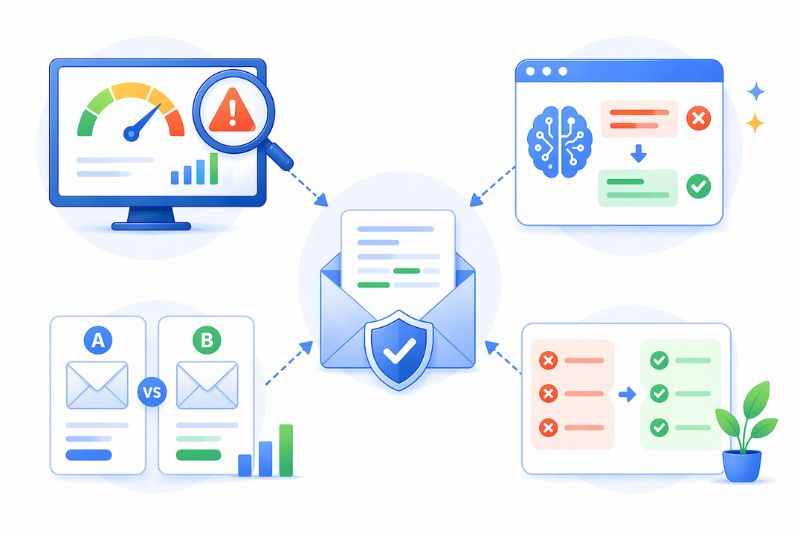
The most reliable approach to avoiding spam trigger words is to find a simple, repeatable workflow you can run before you hit send. When you use the right tools, smart rewrites, and light testing, you reduce spam risk without stripping your emails of personality.
Here’s how to do it.
1. Use Email Spam-Checking Tools
Before sending any campaign, especially cold outreach or high-volume sends, run your draft through an email spam words checker. These tools analyze your spam score by looking at common risk signals, including spammy words, formatting, and structural issues that filters tend to penalize.
The goal isn’t to chase a “perfect score”. It’s to spot patterns: repeated high-risk phrases, overly aggressive CTAs, or subject lines that look promotional at a glance.
As part of this workflow, tools like InboxAlly’s free email word checker can help flag risky language early, so you can fix issues before they affect inbox placement.
2. Use AI for Smarter Copy Refinement
AI is especially useful for improving deliverability when you treat it as an editor, not a copywriter. You can use AI tools to:
- Rewrite specific lines while preserving your original intent
- Flag phrases that sound overly promotional or manipulative
- Suggest more neutral, conversational alternatives
For example, instead of asking AI to “write a better sales email,” prompt it to soften urgency, reduce promotional tone, or make the copy sound more informational. Small shifts in wording often make a measurable difference.
3. A/B Test Word Choices, Not Just Subject Lines
Most teams A/B test subject lines, but word choice inside the email matters just as much. Try testing variations where the only change is the phrasing.
Examples:
- Replace a high-risk financial term with a neutral alternative
- Swap an aggressive CTA for a softer one
- Remove urgency language from one version entirely
When you evaluate results, don’t stop at clicks. Look at inbox placement, reply rates, and spam complaints. Those signals tell you far more about deliverability health than CTR alone.
4. Replace High-Risk Words With Safer Alternatives
One of the easiest ways to reduce spam risk is to rephrase, not remove, your message. Most high-risk terms have neutral alternatives that sound more natural and attract less scrutiny.
In the next section, we’ll break this down in a simple comparison table:
| Common Spam Trigger Word | Safer Alternative or Rephrased Option |
|---|---|
| Free | Complimentary / Included at no cost |
| Act now | We recommend taking action / Next steps |
| Limited time | Available until [specific date] |
| Guaranteed | Backed by / Designed to help |
| Risk-free | No long-term commitment |
| Earn money | Generate revenue / Grow income |
| Click here | Learn more / View details |
| Buy now | Get started / Explore options |
| Special offer | Available option / Current pricing |
| Don’t miss out | Available while spots remain |
| Winner / You’ve been selected | You’re eligible / You may qualify |
| 100% safe | Built with security in mind |
These examples show rephrasing patterns, not guaranteed replacements.
Email Deliverability Best Practices That Go Beyond Words
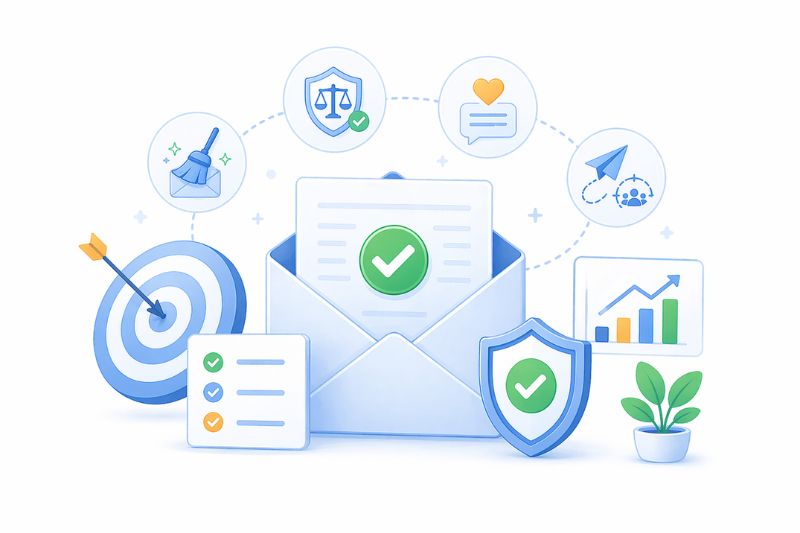
Spam words get a lot of attention, but they’re only one part of the picture. Inbox providers don’t judge emails based on copy alone, they evaluate patterns over time. That includes who you send to, how consistently you send, and how recipients react once your emails arrive.
If those underlying signals are weak, even carefully written emails can struggle to reach the inbox. Strong deliverability is the result of fundamentals working together, not one-off optimizations.
1. Maintain Strong Email Hygiene
Email hygiene is one of the clearest indicators of sender quality. When a large portion of your list doesn’t open, click, or reply, inbox providers interpret that as a sign your emails aren’t wanted, even if no one explicitly marks them as spam.
Maintaining strong hygiene means more than removing hard bounces. In practice, it involves:
- Regularly reviewing engagement data to identify inactive recipients
- Avoiding purchased, rented, or scraped contact lists
- Removing or sunsetting recipients who haven’t interacted within a meaningful timeframe
- Monitoring bounce rates and complaint signals across campaigns
Sending repeatedly to inactive addresses increases the likelihood of spam complaints and quietly degrades IP address reputation over time.
Healthy lists tend to self-correct: higher engagement leads to better inbox placement, which leads to more engagement. Poor hygiene creates the opposite loop, where declining performance reinforces itself.
Want a quick way to clean and validate your list? Try InboxAlly’s free email list verification tool.
2. Stay Compliant With Email Regulations
Compliance is often treated as a legal checkbox, but it also plays a practical role in deliverability. Regulations like the CAN SPAM Act establish baseline expectations for commercial email behavior, including transparency around who the sender is, what the email is about, and how recipients can opt out.
When unsubscribe options are hidden or subject lines feel misleading, recipients are more likely to report emails as spam instead of opting out. Inbox providers weigh those complaints heavily. A small increase in complaint rate can have a disproportionate impact on inbox placement, especially for newer domains or cold email programs.
In practice, compliance reduces friction. Clear identification and easy opt-outs make it easier for uninterested recipients to leave quietly instead of escalating the issue through spam reports.
3. Write for Engagement, Not Filters
Spam filters increasingly model human behavior.
Emails that are opened, read, replied to, or clicked consistently are treated as more trustworthy than emails that are ignored. That’s why writing purely “for filters” often backfires. Overly cautious, generic copy tends to perform poorly with real readers, which leads to lower engagement and, ironically, worse deliverability.
Effective personalization helps here, but only when it adds context. Referencing something relevant to the recipient’s role, industry, or situation signals that the email wasn’t sent blindly, which improves response rates and reduces spam complaints.
Beyond personalization, clarity matters. Natural language, straightforward structure, and a single clear call to action make emails easier to process. When readers know exactly why you’re reaching out and what you’re asking, they’re more likely to engage, even if the answer is no.
4. Be Strategic With Cold Email Campaigns
Cold email is where deliverability fundamentals are tested most aggressively. Without prior consent or engagement history, inbox providers rely heavily on early behavior to decide how future emails should be treated.
Gradual inbox and domain warm-up helps establish predictable sending patterns and gives engagement signals time to accumulate. Sudden spikes in volume or aggressive early sales language can trigger filtering before recipients have a chance to respond positively.
Controlling send volume, spacing follow-ups appropriately, and keeping early messages informational rather than transactional all help reduce risk. The goal of initial cold emails is to establish enough trust and engagement to support future sends.
How These Pieces Work Together
Deliverability works as a system.
- Clean lists support engagement.
- Engagement reinforces sender reputation.
- Strong reputation gives your copy more room to perform, even when you occasionally use higher-risk language.
Spam trigger words matter, but they’re rarely the root cause on their own. When the fundamentals are solid, small copy risks are easier to absorb. When the fundamentals are weak, even neutral language can struggle to reach the inbox.
Conclusion
Email spam trigger words aren’t something you need to obsess over, but they are something you need to understand. Modern spam filters don’t punish individual words in isolation. They react to patterns: how often certain language appears, how aggressively it’s used, and how recipients respond to your emails over time.
The safest approach is practical, not paranoid. Focus on clear, natural language. Rephrase high-risk terms when you can. Test small wording changes and pay attention to engagement and inbox placement, not just clicks. Most importantly, make sure the fundamentals, list quality, compliance, sending behavior, and engagement are working in your favor.
If inbox placement is limiting the performance of your email marketing, book a demo with InboxAlly. We’ll show you what’s holding your emails back and how to improve deliverability so more messages consistently reach the inbox.