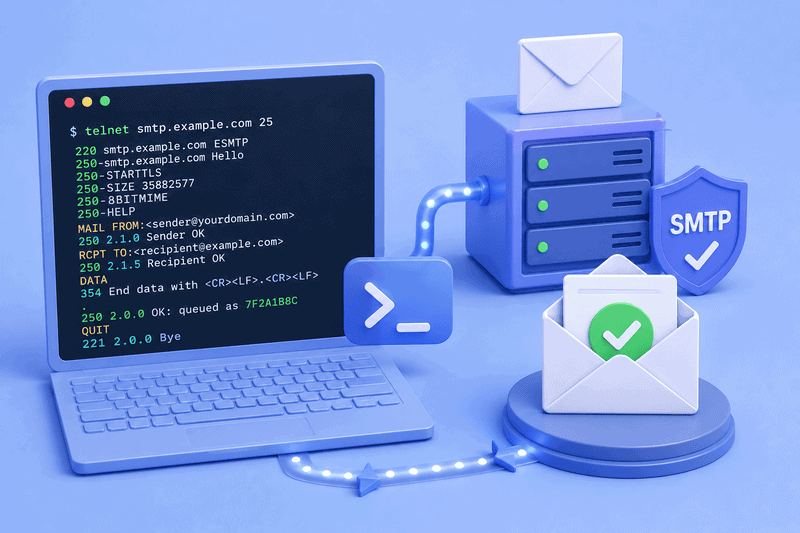
What’s the simplest way to find out whether a mail server is actually accepting your email? Open a terminal, type three words, and read what comes back. Telnet has been the answer for decades, and nothing has properly replaced it.
But while useful, we should also be honest about what it can and can’t do. Telnet opens a raw TCP connection and puts you on the other end of an SMTP exchange, typing the commands yourself. You’ll see the greeting, the response codes and the handshake. What you won’t see is whether Gmail forwards your email to Primary, Promotions, or Spam. Those are two different questions, easily confused.
This article covers what telnet still does well in 2026, how to run the test on all operating systems, and where it stops being the sharpest tool in the shed.
Key takeaway
- A telnet SMTP test verifies that you can reach a mail server and that it accepts your connection, commands, and message.
- Server acceptance («250 OK queued as…») does not indicate a good inbox placement.
Why anyone still uses Telnet

The protocol is forty-plus years old, and the use case has narrowed, but it hasn’t completely disappeared. Engineers still use telnet when they want to confirm three things in order: that the port is reachable from their network, that the server is responding, and that the SMTP conversation runs to completion without rejection.
You’d run a telnet SMTP test when:
- A new server isn’t receiving mail, and you want to confirm it’s actually listening.
- An ISP or cloud provider may be blocking outbound port 25, and you need proof
- A relay is bouncing messages, and you want to see the exact response code the server returns
- An ESP or API is failing, and you want to compare its behavior to a raw connection
What telnet tells you in all of these cases is whether the door is open. Whether anyone reads the letter you slipped under it is a separate problem, and one we’ll get to.
Installing telnet

Telnet ships in fewer places than it used to. On most modern systems, you’ll need to install or enable it before the first session.
Windows. Open PowerShell as administrator and run:
Enable-WindowsOptionalFeature -Online -FeatureName TelnetClient
This works on Windows 10, 11, and Server 2012 R2 and later. Older systems can use dism or pkgmgr equivalents, though if you’re on Windows 7 in 2026, the telnet client is the least of your problems.
macOS. Apple removed telnet from the default install years ago. Reinstall it using Homebrew:
brew install telnet
Linux. Use your distribution’s package manager:
sudo apt install telnet # Debian, Ubuntu, Mint
sudo dnf install telnet # Fedora, RHEL, CentOS
sudo pacman -S inetutils # Arch, Manjaro
Worth noting: a lot of practitioners skip telnet entirely now and use openssl s_client for everything, since it handles both plain and encrypted connections. More on that below.
Running an SMTP session, start to finish
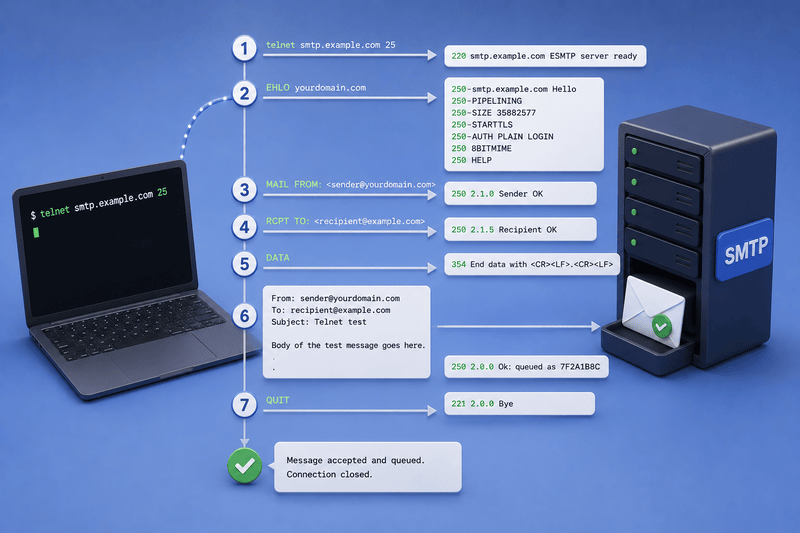
A real-world test would look something like this:
Connect to a server on port 25 (or 587, or 2525, depending on what you’re testing):
telnet smtp.example.com 25
If the connection opens, the server greets you:
220 smtp.example.com ESMTP server ready
That 220 tells you that the door is open. From there, you introduce yourself with EHLO, which asks the server to list its supported extensions:
EHLO yourdomain.com
The server replies with a block of 250 lines telling you what it can do: PIPELINING, SIZE limits, STARTTLS support, available AUTH mechanisms, and so on. Read this carefully because it tells you what your client could theoretically negotiate next.
Now set the envelope. The sender:
MAIL FROM: <sender@yourdomain.com>
Server replies 250 2.1.0 Sender OK. The recipient:
RCPT TO: <recipient@example.com>
If the recipient is valid and the server is willing to accept mail for that address, you’ll get 250 2.1.5 Recipient OK. If not, this is where things can go wrong, so the rejection message is the most useful piece of information in the entire session.
Then the message itself:
DATA
From: sender@yourdomain.com
To: recipient@example.com
Subject: Telnet test
Body of the test message goes here.
The period on its own line ends the message. The server responds:
250 2.0.0 Ok: queued as 7F2A1B8C
Finally, close the connection:
QUIT
That queued as confirmation is what most guides treat as the success state, and for the narrow question, telnet was built to answer, it is. The server accepted your message. It put it in its outbound queue. Done.
Port 25 is probably blocked
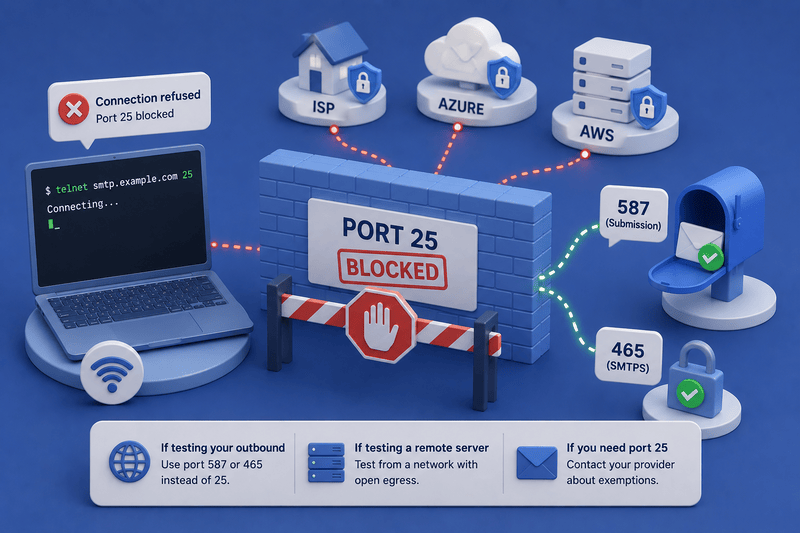
Another thing to keep in mind that might confuse you is that port 25 is closed almost everywhere. Consumer ISPs block it to stop infected machines from spewing spam. Cloud providers block it for the same reason. In fact, Azure blocks all outbound SMTP connections on TCP port 25 for deployed VMs to ensure better security, protect the Azure platform, and comply with industry standards. AWS does the same on EC2 instances unless you submit a removal request.
So when your telnet smtp.example.com 25 hangs or returns a connection refused error, the server isn’t necessarily down. Your egress path is closed, and the fix depends on what you’re testing:
- If you’re testing your own outbound capability, try port 587 or 465 instead.
- If you’re testing a remote server’s reachability, run the test from somewhere with open egress (a server you control, a different network).
- If you need to use port 25 specifically because you’re acting as an MTA (Mail Transfer Agent), take it up with your hosting provider; they may exempt you or move you to a subscription tier that allows it.
This single issue is responsible for an enormous percentage of «telnet doesn’t work» support tickets. Always confirm your network can actually reach port 25 before assuming the destination server is the problem.
Where telnet isn’t enough
Telnet speaks plaintext, which is fine for a handshake test on port 25, but most production SMTP servers in 2026 require TLS before they’ll let you authenticate or relay. Telnet is out of its depth when you see 250-STARTTLS in the EHLO response and need to actually use it.
This is where openssl s_client takes over. The command:
openssl s_client -starttls smtp -connect smtp.example.com:587
negotiates STARTTLS on port 587, then drops you into what looks and feels like a telnet session with the same SMTP commands and the same response codes, but now encrypted. For implicit TLS on port 465, use the -starttls smtp flag. Authentication, real message transmission to most modern servers, and any test that involves credentials should run through OpenSSL, not telnet.
The practical rule: telnet for connectivity and unencrypted protocol observation, OpenSSL for anything involving TLS or authentication.
What telnet won’t tell you
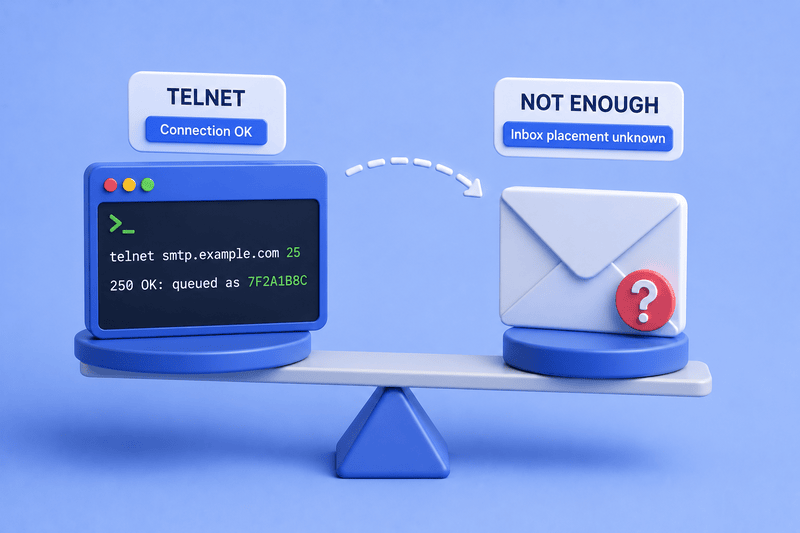
A successful telnet session ends with 250 Ok: queued as… and means that the server accepted your message. The important question for anyone sending marketing or transactional mail at scale is what happens after that. The server queued the message, then it tried to hand it off to the recipient’s mailbox provider. That provider made its own decision about whether the message belongs in Primary, in Promotions, in Spam, or in a black hole nobody checks.
None of that is visible in your telnet output. The server’s queue acceptance has almost nothing to do with how Gmail or Outlook will classify the message on arrival, which depends on your domain reputation, your engagement history, your authentication setup, and the recipient’s past behavior with mail from you.
Inbox placement is a separate problem solved by a separate category of tools. InboxAlly exists in that category as it generates the engagement signals mailbox providers use to decide where mail lands, which is the question telnet was never designed to answer.
Closing thoughts
Telnet hasn’t lost its place, it just has a smaller one. Use it to confirm the server is reachable and the conversation runs clean. Once you’ve done that, stop asking it questions it can’t answer and move on to the tools built for inbox placement.
One such tool is InboxAlly, which generates the engagement signals mailbox providers use to decide whether future emails belong in the Inbox, Promotions, or Spam. By creating positive interaction patterns around your sends, it helps improve the part of deliverability that Telnet was never designed to measure. Book a free demo and see what it can do for your sending setup.