
Setting up an SMTP server correctly requires more than technical access and good intentions. You can get the server running in an afternoon, but whether it’ll send your emails to the inbox or the spam folder depends on how it behaves over time. Most advice out there is pretty basic: “open the right port, use a strong password.” That’s the equivalent of telling someone to “drive safely” without explaining how road signs work or why the tires are flat.
In other words, “it sends” and “it lands” are two very different problems.
In this article, we’re going beyond the basic setup guides to examine the operational mechanics that determine your email performance.
You will learn:
- Why a successful SMTP handshake doesn’t guarantee inbox delivery
- How legacy ports like 25 affect modern sending infrastructure
- What proper SPF, DKIM, and DMARC alignment looks like in practice
- When running your own email server makes sense, and when it becomes a risk
Let’s get started.
Key takeaways
- SMTP (Simple Mail Transfer Protocol) only confirms that an email was accepted by another server. It does not control inbox placement. Ports, authentication, and TLS keep mail moving, but they don’t determine where it ends up.
- Most SMTP problems start as slower delivery, throttling, or gradual loss of inbox placement, and they’re often hard to notice unless you’re intentionally looking for them.
What SMTP does (and what it definitely doesn’t)

SMTP’s job is to hand your message off to another server and get an answer back. That’s all it does. It doesn’t decide where the email lands, how it’s filtered, or whether a human ever sees it. Treating SMTP like an inbox authority is how you can end up debugging the wrong thing for weeks.
When your system says “email sent,” all it really means is that an SMTP server accepted the message. But accepted does not mean delivered. It doesn’t even mean queued for delivery in the way most people think about email delivery. It simply means the receiving server agreed to take responsibility for the message. What happens next (spam filtering, reputation checks, etc.) occurs after SMTP completes its part.
You can think of SMTP as the handshake between systems. Your app or mail client connects to an SMTP server, authenticates, negotiates encryption, and passes the message along to other mail servers. That server then repeats the process with the recipient’s mail server. Once the handoff is complete, SMTP steps aside and never sees the final outcome.
This distinction is important because SMTP failures are usually obvious, while deliverability failures are subtle and slow. A faulty SMTP configuration returns errors, blocks sends, or simply times out. A perfectly “working” SMTP setup can still feed messages into spam filters if the server address, hostname, or server details don’t align.
If you don’t separate sending mechanics from inbox behavior, you’ll misinterpret the meaning of your server’s behavior and try to fix things that were never broken in the first place.
Ports, encryption, and why 25 keeps getting people into trouble

The SMTP port number is a major factor in whether outgoing mail reaches the recipient’s inbox.
Port 25 is the original SMTP port, and it still works, just not in the places some senders are trying to use it. ISPs block it by default. Cloud providers rate-limit it, monitor it aggressively, or shut it down entirely. That’s because port 25 is the favorite entry point for spam and malware. Outside of private networks or server-to-server mail transfer, using it today is an invitation for delivery issues you don’t control.
Ports 465 and 587 exist to solve that problem, but they do it differently. Port 465 uses implicit TLS, meaning the SMTP connection is encrypted from the first byte. No negotiation, no downgrade. Port 587 uses STARTTLS, which starts unencrypted and then upgrades the connection to TLS once both sides agree. In practice, both are secure in a good SMTP mail server configuration.
STARTTLS can fail when encryption is optional, misconfigured, or disabled by intermediary systems between sending and receiving servers. Implicit TLS fails with very obvious errors. That’s a feature, not a bug.
Here’s how these ports fit into day-to-day setups:
- Port 587: default for authenticated sending from apps, clients, and SaaS tools. Works almost everywhere and goes well with modern SMTP servers.
- Port 465: good for when you want encryption enforced and predictable behavior, in controlled environments like app servers sending transactional email.
- Port 25: acceptable for internal server-to-server traffic. High risk everywhere else.
Choosing the wrong port won’t always cause issues with sending. It will just make problems harder to see and harder to fix later.
Authentication: the part everyone underestimates
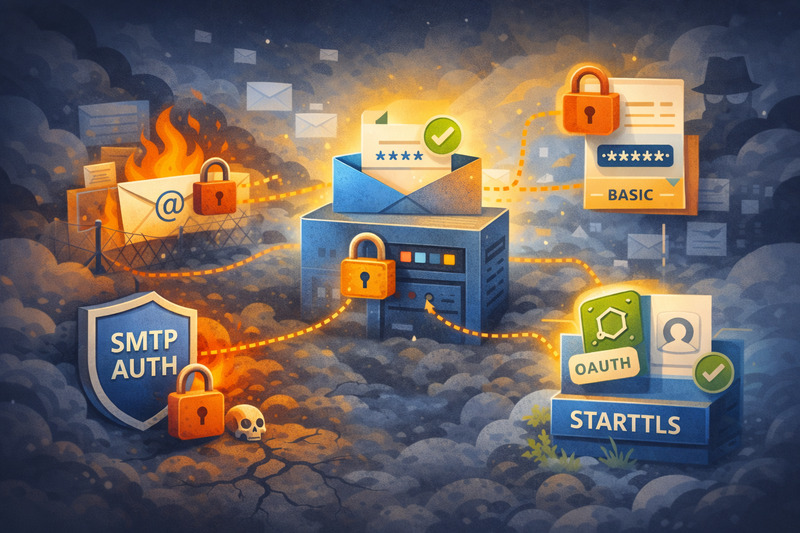
SMTP authentication is simply proof that you’re allowed to send mail through a server. Your system connects, presents authentication credentials, and the mail server decides whether to relay the message or shut the door. This is something that happens way before reputation, filtering, or inbox placement even comes into play. If authentication is not set up correctly, nothing else matters.
There are a few different authentication methods. Basic authentication means sending a username and password with each connection. It’s simple, widely supported, and increasingly unacceptable. OAuth replaces static credentials with short-lived tokens linked to identity and permissions. Microsoft’s move to disable basic authentication wasn’t some stubborn ideology. It’s rather the leaked passwords and automated abuse that made it impossible to defend at scale.
Misconfigured authentication doesn’t always fail cleanly. More often, it degrades behavior in indirect ways:
- Messages are being sent, but throughput drops after a few minutes.
- Some relays accept mail while others reject it with vague errors.
- Rate limits trigger unpredictably, even at low volume.
- Emails disappear without bounces because the relay never fully accepted responsibility.
In plain terms, an unclear sender identity always leads to unreliable email delivery.
The tradeoffs of using third-party SMTP vs running your own

While it does sound attractive to “be your own boss”, the sense of control when running your own SMTP server wears off the first time you land in a Microsoft black hole. In theory, managing your own Postfix or Exim setup gives you total sovereignty over your headers and data privacy, but in practice, you’re just inheriting a full-time job in infrastructure maintenance that has nothing to do with your core product.
Standard SMTP service relays like Postmark, SendGrid, or AWS SES exist because they’ve weaponized the scale of their IP address and domain reputation.
When you use a third-party provider, you aren’t just paying for the API; you’re paying for the army of deliverability engineers who spend their entire day negotiating with ISPs to ensure “Priority” inboxing. If you “fly solo”, you are the one responding to a sudden blocklist from a German ISP at 3:00 AM because one outbound campaign triggered a heuristic filter you didn’t know existed.
The regret usually sets in around month six. By then, the initial “cost savings” of local SMTP have been swallowed whole by the engineering hours spent debugging why your password reset emails are taking forty minutes to arrive. You’ll find yourself experimenting with DKIM rotations and SPF flattening instead of building features. Unless you are operating at a massive, specialized scale where every millisecond of data residency is a legal requirement, DIY mail servers are a liability disguised as an asset.
New SMTP setup? InboxAlly helps you warm it the right way by earning inbox placement early, not hoping to “figure it out” later. Book a free demo and see what it can do for your email setup.
Best practices for running an SMTP server

Now, if you decide to run an SMTP server, make sure you do everything you can to keep it healthy. Running an SMTP server isn’t easy, but it’s not impossible either. Below are some best practices you should incorporate directly into your sending routine:
- Start slow and steady: New or recently changed SMTPs should ramp volume gradually. Sudden bumps in volume, uneven daily patterns, or “quiet all week, ravenous on Monday” schedules attract issues. Consistency earns more trust than clever scheduling ever will.
- Segment traffic by intent: Transactional, system alerts, and bulk email messages should not share the same sending patterns or queues. Mixing them guarantees that bad campaigns eventually drag important mail down with it.
- Be ruthless about recipients: Don’t send to people who didn’t ask, haven’t engaged, or clearly don’t exist. Dead addresses, role inboxes, and scraped lists poison reputation.
- Measure outcomes: Send count is meaningless on its own. Watch time-to-inbox, provider-level performance, and engagement decay. Sending is easy. Sending well is a discipline you must have.
Nothing here reinvents the wheel, but with fresh SMTP servers, it’s super important not to miss any of it. Things you might get away with on third-party mailing platforms are far less forgiving on your own infrastructure, so be deliberate about how you send.
A different way to look at SMTP servers
If this article did its job, you should feel slightly uncomfortable but in a good way. Not because setting up an SMTP is hard, but because it’s easy to think you’ve “done it right” while campaign metrics tell a different story. Once you can really see where mail lands, the technical decisions get simpler and a lot less expensive.
But if you want visibility and top-notch inbox placement from day one, especially on your brand-new SMTP, book an InboxAlly demo and see how to get there before small issues turn into long recoveries.