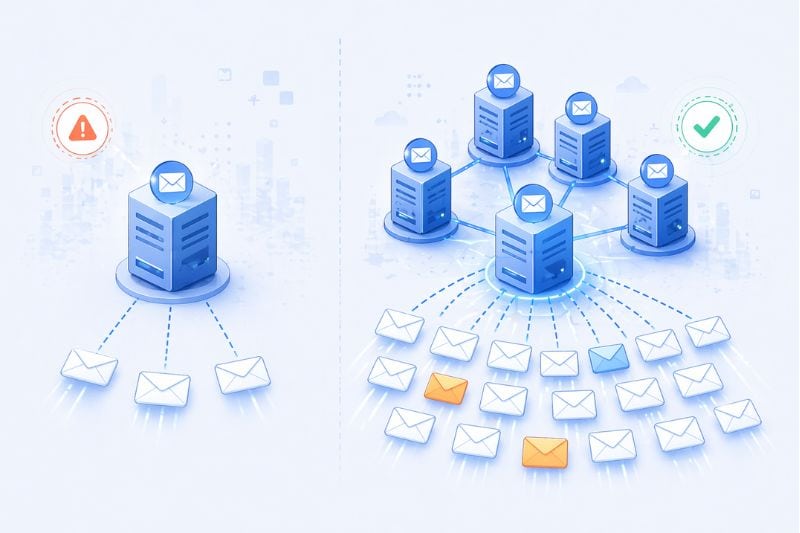
Ask ten people how many cold emails you should send per day, and you’ll get ten numbers. Fifty. A hundred. Two hundred if someone’s feeling brave. The problem is that every one of those numbers is correct for some sender and catastrophic for another, and you often can’t know which one works for you before you send.
The same 100 emails can land in primary for one sender and get an inbox suspended for another, and the reason isn’t always about the volume. Google Workspace technically lets you send 2,000 emails a day, but while true, that limit is functionally meaningless for cold outreach.
So rather than quoting a number and pretending the number is the answer, let’s go through what the sending limit actually depends on, what safe sending looks like in 2026, and how to scale without wrecking your sending domain.
Key takeaway
- The safe daily number for your setup is a combination of domain age, warmup status, list quality, reply rate, and complaint rate.
- Most successful senders send 20-50 cold emails per inbox per day, and scaling beyond that comes from adding inboxes and domains.
The number everyone quotes is the wrong number
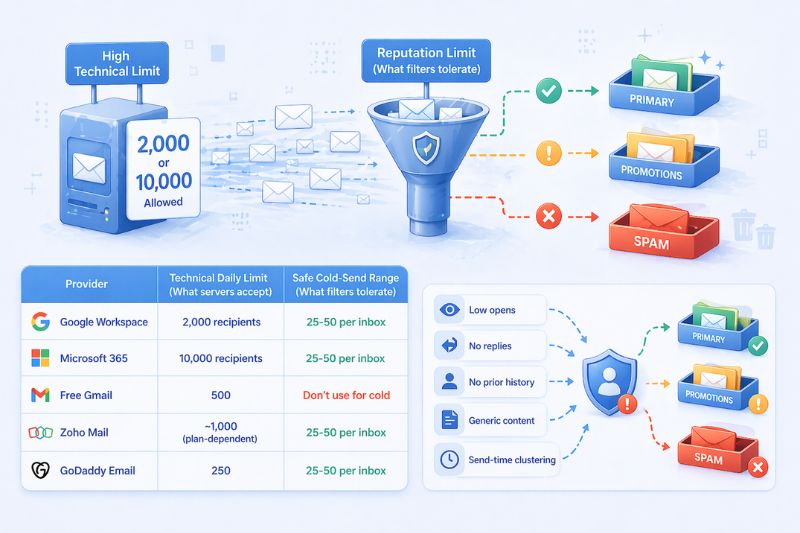
When someone searches “how many cold emails per day,” they usually land on Gmail’s 2,000 figure or Microsoft’s 10,000 and think they’ve found their answer. What they’ve actually found is the speed limit on an empty highway. The road permits it, but the car might not handle it.
There are two different numbers at play for every mailbox provider. The first is the technical limit: what the server will physically accept from your account. The second is the reputation limit: what mailbox filters will tolerate before they start routing your mail into promotions or spam folders. The first is generous because email providers assume you’re sending a legitimate business email. The second is much less so, and it’s the one that decides whether your campaigns actually reach anyone.
Here are some email service providers and their limits, side by side:
| Provider | Technical daily limit | Safe cold-send range |
|---|---|---|
| Google Workspace | 2,000 recipients | 25–50 per inbox |
| Microsoft 365 | 10,000 recipients | 25–50 per inbox |
| Free Gmail | 500 | Don’t use for cold |
| Zoho Mail | ~1,000 (plan-dependent) | 25–50 per inbox |
| GoDaddy Email | 250 | 25–50 per inbox |
The technical number is imposed by how spam filters read your behavior once they start seeing your campaigns as cold outreach. Low opens, no replies, sends to recipients with no prior history with your domain, generic content patterns, send-time clustering, any one of these is enough to flip you from “business sender” to “probable spam” in the inbox providers’ view. Once you’re in the second bucket, the rules change.
What determines the daily limit
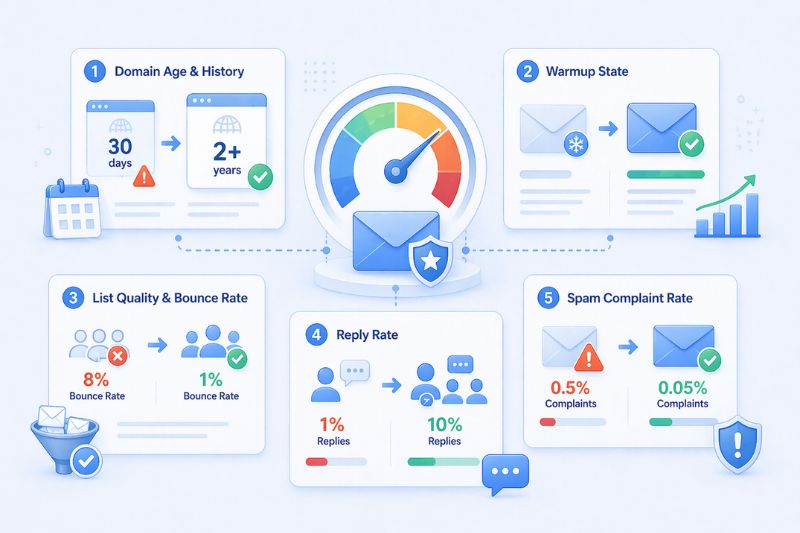
The reason the same 100 emails can land in the primary inbox for one sender and blow up spam on another is that the daily number comes down to the individual sender’s reputation. Your ceiling is set by five factors, and none of them have to do anything with what your ESP allows.
- Domain age and history. A domain under 90 days old is an unknown quantity to mailbox providers, and unknown quantities are looked upon skeptically. Older domains with a history of sending legitimate mail can absorb higher volumes of email that would trigger filtering on a fresh one.
- Warmup state. A warmed-up domain has a record of positive engagement. That means it opens with genuine read time, replies, movement out of promotions, clicks on links, etc. A cold domain, even a technically old one, has no such record and gets treated accordingly.
- List quality and bounce rate. Nothing ruins a sender’s reputation faster than a bad list. Bounce rates above 3-5% tell inbox providers you’re sending to addresses you shouldn’t have, which is the behavioral fingerprint of scraped or stale data. Clean lists let you send more; dirty lists force you to send less.
- Reply rate. This is probably the most underrated lever in cold email. Replies are the single strongest positive signal a mailbox filter reads, because it’s easy to replicate fake engagement, but not so much with replies. A campaign with 10% replies can sustainably send a higher number of emails per day that would easily sink a 1% campaign.
- Spam complaint rate. Keep spam reports below 0.1%, which is one complaint per thousand sends. That sounds like a lot of room, but it isn’t. A generic subject line and a poorly-targeted list will reach that number surprisingly fast.
Another thing to keep in mind before we move on: most of the time, senders assume that bigger lists give them more sending room, because a bigger list equals more prospects equals more volume. The opposite is usually true, and we’ll get to why in a moment.
A realistic ramp-up schedule
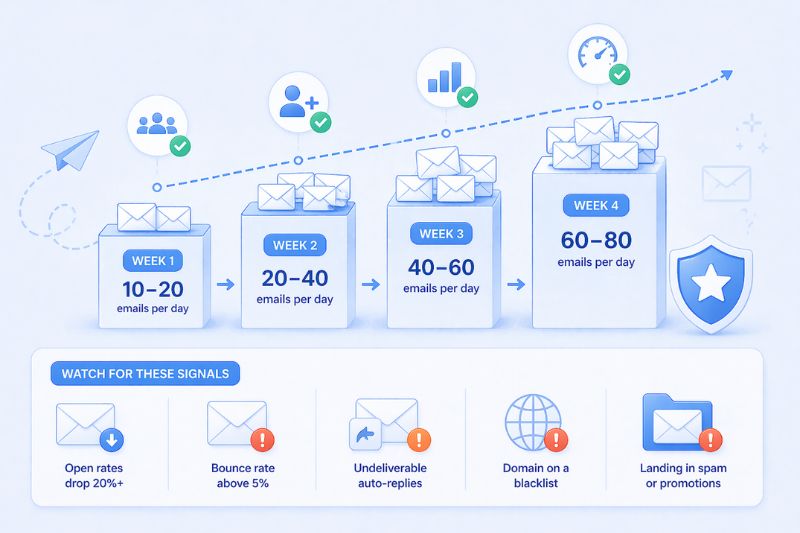
For a new domain, ramping from zero to cruising speed takes time and looks boring, but this is actually the shape of a well-planned warm-up process.
- Week 1. 10-20 emails per day. Mostly to contacts who will likely open and reply. Colleagues, friendly recipients, seeded accounts.
- Week 2. 20-40 per day. Start introducing real prospects, carefully. Keep the ratio of engaged recipients high.
- Week 3. 40-60 per day. Watch your engagement metrics. If the open rate is good and bounces are low, feel free to continue. If anything is off, pause and reassess.
- Week 4. 60-80 per day, if and only if the prior weeks looked good. At this point, you have a baseline.
Four weeks is usually enough to make your sending domain usable. From then on, eight to twelve weeks will make it mature. The sender reputation people quote as bulletproof typically has a year or more of consistent, clean history behind it.
While you’re ramping up your sending volume, watch out for these warning signs that tell you to stop and diagnose before you continue:
- Open rates suddenly drop by 20% or more
- Bounce rate goes up above 5%
- You start receiving an unusual volume of “undeliverable” auto-replies
- Your domain shows up on a blacklist check
- Consistent placement in spam or promotions when you test with a seed account
Pushing through warning signs is not a great idea, and it’s most often how senders end up with permanently damaged domains they eventually abandon.
Those warning signs are your last cheap exit. If you want a faster way to rebuild trust instead of pausing for weeks, try InboxAlly free and reinforce the reputation signals inbox providers look for while you focus on reaching your target audience.
How to scale cold email campaigns past 100 emails a day
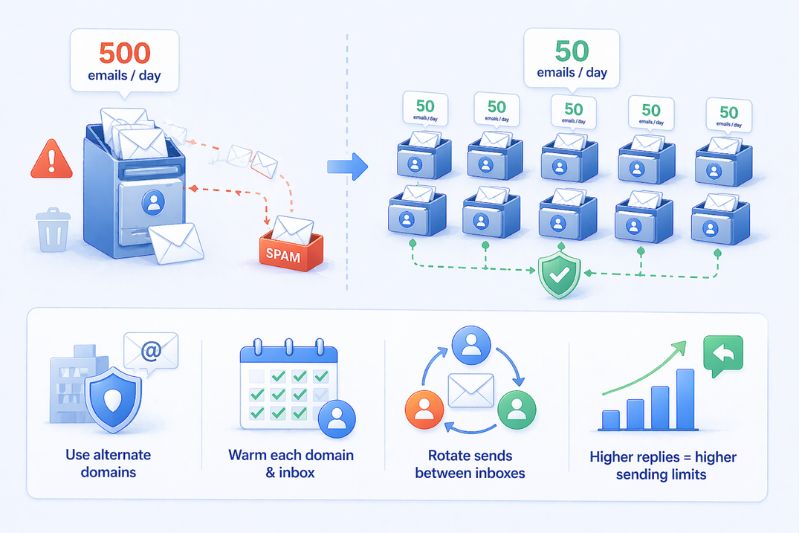
We’ve mentioned list size earlier, and here is why it’s important. Most senders end up sending too many cold emails, trying to scale by raising the per-inbox number. They go from 50 to 100, from 100 to 200, and somewhere along the way, their domain’s reputation weakens, and they can’t figure out why. The answer is that the per-inbox scale has a limit that’s mostly unrelated to how much you want to send. It’s set by the behavioral tolerance of the filter, not by your appetite.
So, instead of sending 500 from one inbox, send 50 from ten inboxes and several domains. Each inbox works inside its safe range, each domain holds its positive sender reputation, and the system as a whole produces the volume you wanted. If one domain gets flagged, the others keep running. Diversified risk, not concentrated risk.
A few rules that make multi-domain sending work:
- Never send cold campaigns from your primary corporate domain. One bad campaign can blacklist the domain your customers, investors, and team use for other important emails. Buy variations (getapp.io, tryapp.com, app-name.com) and send from those.
- Warm each domain and each inbox individually. You can’t shortcut this by warming up one and assuming the reputation will transfer.
- Rotate sends between inboxes. Each one should look like a human working a normal day, not a bot burning through a list.
The other advantage worth taking, and arguably the most powerful one, is reply rate. Higher replies raise your email sending limits organically since engagement is one of the best positive signals a mailbox filter can read. A well-targeted list sending 50 emails a day with a 12% reply rate will outperform a sloppy list sending 500 with a 1% rate on every metric that matters: pipeline, reputation, and how much volume you can eventually sustain.
Engagement signals are the real currency of cold email. Volume is what you get to spend once you’ve earned it.
Conclusion
Every time someone asks how many cold emails they should send per day, they’re asking the wrong question. The right question is what their setup needs to be trusted to send more. That shift, from volume planning to reputation engineering, is the only sustainable practice in cold email. Email filters change their own rules all the time, and if you want to survive it long-term, you need to treat reputation as the primary asset and a higher volume as a consequence of that.
If you manage to hit your volume numbers year after year, it means that you’ve built the infrastructure to turn 50 emails a day into a pipeline, then let that compound while everyone else was busy getting blacklisted.
If you want a practical next step, don’t change your daily number; change the conditions that set it. Book a demo with InboxAlly and see how it can help you build a safer sending foundation while you scale over multiple domains and inboxes.