Email deliverability is an extremely important part of any email marketing campaign. You shouldn’t take it for granted just because the send button worked. Sure, the campaign may appear as “delivered,” but there’s a lot more happening before your audience sees it.
Placement influences how people experience your emails and whether they stay engaged with what you send next. That’s why you should treat deliverability with real care and attention.
In this post, we’ve gathered the key insights you need to understand what inbox providers judge, which metrics are important, and how to set things up so that your emails stay in front of your audience.
Key takeaways
- Email deliverability metrics say a lot about deliverability. Watch for bounces, complaints, engagement, and placement trends as they show exactly how inboxes see you
- List quality comes first. Inactive or stale contacts drag reputation down faster than any other issue
- Consistency builds trust. Steady sending, proper authentication, and predictable behavior keep your domain in good standing
What is deliverability?
Deliverability is not a single metric, but actually three different layers stacked on top of each other:
Delivery rate is the most basic layer. It simply means the receiving server accepted your message. That’s it. It doesn’t confirm where the email landed or whether anyone will ever see it. Delivery rate is determined by things like:
- Hard bounces (bad addresses)
- Soft bounces (temporary issues)
- Throttling and server-level filtering
A 99% delivery rate can still hide a disaster if everything is getting routed to spam.
Inbox placement is what we usually care about the most. This is the difference between landing in the primary inbox, the promotions tab, or the spam folder. Spam filters look at the content, engagement, sending history, and authentication before deciding where to put your emails. An email can be “delivered” but still end up somewhere where the reader never checks, which is why relying on delivery rate alone gives people a false sense of security.
The third layer is the sender reputation, the long-term score mailbox providers keep for your behavior. It’s determined by how often your emails get opened, deleted, marked as spam, saved, etc.. It also tracks list hygiene, spam complaints, sudden volume spikes, inconsistent schedules, basically everything you’ve done over the last few weeks or even months. Reputation decides whether your next campaign gets a fair chance at being engaged with.
Marketers sometimes confuse “delivered” with “seen” because dashboards mix these terms. But remember that the main question with deliverability is where your emails land, not just whether the server lets them through.
Email deliverability metrics to keep an eye on

To determine your sending practices and, by extension, your deliverability, mailbox providers rely on a small set of key metrics. But most ESP dashboards barely scratch the surface of explaining this, so here are the most important factors affecting email deliverability:
Bounce rate
A bounce tells you the email didn’t reach the mailbox. Hard bounces mean the address is nonexistent. Soft bounces mean the mailbox is full, busy, or temporarily refusing mail.
Even small changes in your bounce rate are worth paying attention to. When it goes up, providers assume your list hygiene is not great, and they start treating you more cautiously.
Spam complaints
This is the one metric you can’t hide from. A tiny jump, even fractions of a percent, clearly shows that your audience didn’t want the email at all. Providers treat complaints as the most reliable form of negative feedback, and reputation can drop surprisingly fast when spam complaints rise.
Spam traps
Spam traps are the “gotcha” email addresses for senders who send to old, cold, or purchased lists. Pristine traps were never real users and have been created for this one purpose. Recycled traps used to be real inboxes but were turned into detectors later.
If you’re landing on them non-stop, you’re probably emailing people who haven’t interacted in a long time. Providers read that as a quality problem, not bad luck.
Unsubscribe rate
Unsubscribes are fine, which is why your emails should always include an unsubscribe link. They’re far less problematic than complaints and can actually improve long-term engagement. A sudden increase usually means your frequency or content didn’t live up to people’s expectations
Inbox placement rate
As we’ve mentioned, “Delivered” doesn’t tell you where the email landed, only that the server accepted it. You need external tools to understand how often your emails reach the primary inbox, promotions tab, or spam folder. ESPs don’t show this, and they never have.
Engagement
Opens, clicks, read time, and deletes without reading are, in a way, similar to voting. Positive engagement votes for value in your emails, while negative votes against it and push you out of the inbox.
Reputation: the scoreboard of inbox placement

Every email server has a reputation, even if it never looks at it. Mailbox providers track your behavior over months and treat that history as a running score. Once that score drops, the inbox gets harder to reach, no matter how “good” your next campaign is.
Domain reputation
You can switch platforms, redesign templates, or move to a new server, but the domain’s record comes with you. Providers look at how people react to your emails over time and give your domain a reputation based on that. And if that reputation crashes, there’s no quick fix: you either rebuild it slowly or switch to a new domain.
IP reputation
IP reputation is another part of deliverability, and it’s based on your sending habits and how your subscribers engage. There are two types of IP addresses:
- A dedicated IP with a clean record that’s tied only to your brand.
- A shared IP combines your activity with whoever else is on it.
Filters want to see regular patterns. Big spikes, long breaks, or sudden jumps in volume make providers suspicious since it doesn’t look like normal human behavior.
Authentication as a trust marker
SPF, DKIM, and DMARC may look complicated, but the idea behind them is easy: prove the sender is authentic and the email wasn’t changed:
- SPF (Sender Policy Framework) says which servers are allowed to send mail for your domain.
- DKIM (DomainKeys Identified Mail) attaches a digital signature.
- DMARC (Domain-based Message Authentication) tells providers how to handle failures.
When these are not present, even good lists and good content can end up in spam because of the identity mismatch.
Reputation isn’t built on big wins but on predictable sending. The more your patterns look like a responsible sender, the more reliably you reach the inbox.
How to measure deliverability

Even though you should measure deliverability, the best method is still a simple system that shows whether inboxes trust you or not. Here’s the framework you can follow:
Start with seed tests
Seed tests show you roughly where your emails land with different providers. They’re helpful, but you should treat them as directional: if a seed is going to spam, something in your setup probably needs attention.
If you want seed tests that don’t send you on a wild goose chase and the best deliverability you can get, book a free trial with InboxAlly.
Check the mailbox provider tools
Google Postmaster Tools, Microsoft SNDS, and Yahoo’s feedback data give you the closest thing to direct insight into how internet service providers score you.
They show trends, not exactly perfect numbers, but you’ll see some patterns in domain reputation, IP reputation, email authentication, and spam complaint rates. If your graph turns downward, inboxes are likely already adjusting your placement.
Watch real-world engagement
Engagement shows inbox placement better than any test. Higher opens, longer read times, and a stable click-through rate usually mean that inboxes are treating you well. Sharp drops, on the other hand, often mean you’re being pushed toward promotions or spam. Your audience’s actions are the best sign of what’s happening.
Monitor bounce and complaint trends over time
A single bad campaign won’t ruin your reputation, but trends can. Weekly changes in bounces or complaints say a lot more than one rough send. If soft bounces go up, your emails are likely getting throttled. If complaints go up, your targeting or opt-in probably needs adjustment.
Diagnose sudden drops with context
Reputation rarely crashes out of nowhere. It usually happens after a cold list send, a rushed import, an aggressive holiday blast, or a bad segmentation mistake. When your key deliverability metrics show a decline, look at what you changed recently.
With all this in mind, deliverability becomes much easier to handle — way better than catching up only when something goes wrong.
What “good” looks like: realistic benchmarks in email campaigns
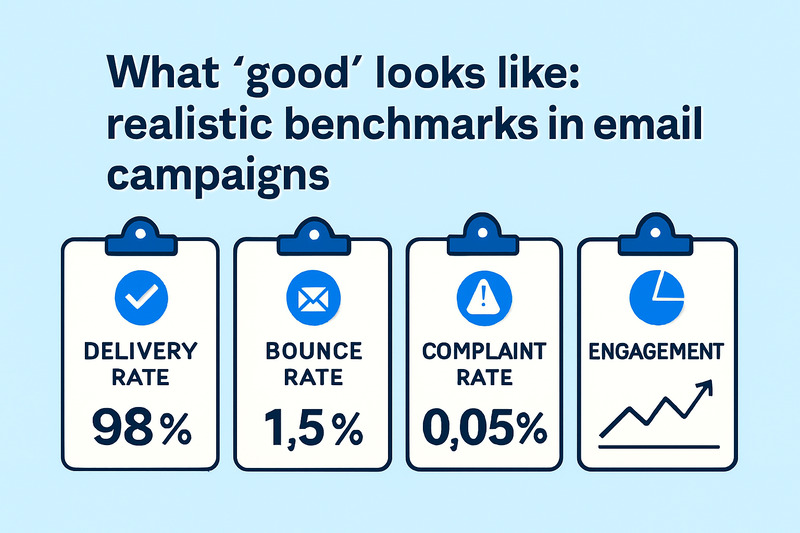
Benchmarks should calm you down and prevent you from falling into the trap of looking at someone else’s spreadsheet. There’s no universal standard because every audience behaves differently, but there are healthy ranges to keep an eye on.
A good delivery rate should sit around 97–99%. If you’re below that, you’re either sending to too many bad addresses or your domain is running into technical issues before it reaches the inbox.
A bounce rate under 2% is normal. Anything higher usually means messy imports, old contacts, or a sudden jump in sending that mailbox providers didn’t like.
For complaint rates, you want to stay below 0.1%. Gmail is even stricter; it starts holding you back long before that threshold. If complaints go up, it’s time to re-check your targeting and timing.
Engagement depends on context. There’s no “ideal” open rate because quality varies wildly by list age, consent, and how well your content fits the audience. What you’re watching for is direction:
- Are opens and clicks stable?
- Are deletes without reading increasing?
- Are cold segments pulling the whole list down?
Benchmarks are not carved in stone. They won’t tell you how to run your business, but they will show you when something isn’t right, and that’s what keeps deliverability from spiraling before you even notice the first warning sign.
Wrap-Up
You’re now equipped with a practical way to measure and maintain deliverability instead of guessing your way through dashboards. Don’t sit on this! Start tracking important metrics before your next campaign goes out.
Here are the key things to keep in mind from this guide:
- Clean your lists
- Keep sending consistent
- Cut cold segments early
- Use seed tests for even better insight
And if you want top-notch inbox placement, book a demo with InboxAlly. We’ll show you exactly what’s holding you back and how to turn it around to get your emails delivered to your recipient’s inbox every single time.