

SMTP response codes are the status messages that mail servers return during an email transaction. Every time you send an email, the receiving server replies with a three-digit code that tells your sending server exactly what happened: accepted, try again later, or permanently rejected.
Understanding these codes is essential for diagnosing delivery failures and maintaining sender compliance. The first digit tells you the severity — 2xx is success, 4xx is a temporary failure where your server retries, and 5xx is a permanent rejection. Enhanced status codes (like 550 5.7.26) add a second layer of detail: the class, subject category, and specific issue.
The reference below covers the codes most relevant to email deliverability, including the provider-specific enforcement codes that Gmail, Microsoft, and Yahoo introduced with the 2024–2025 bulk sender requirements.
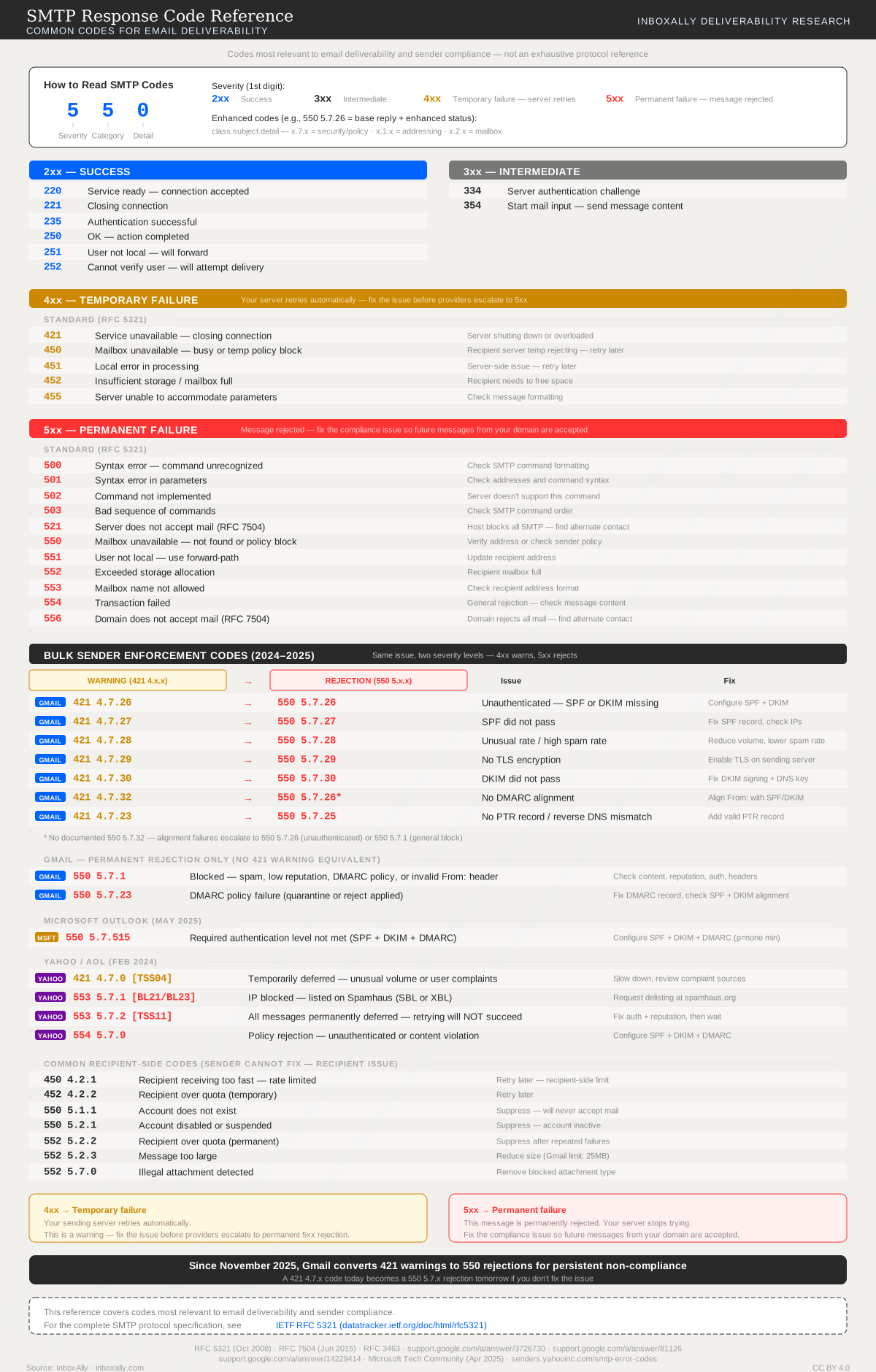
How to read SMTP codes
Every SMTP response has a three-digit base reply code and, for modern systems, an enhanced status code that gives more detail.
Base reply code (e.g., 550):
- First digit — severity:
2= success,3= intermediate (needs more input),4= temporary failure,5= permanent failure - Second digit — category:
0= syntax,1= information,2= connection,3= unspecified,5= mail system - Third digit — specific condition within that category
Enhanced status code (e.g., 5.7.26):
- Follows
class.subject.detailformat x.7.x= security or policy issue (the most common category for deliverability problems)x.1.x= addressing issuex.2.x= mailbox issue
When you see 550 5.7.26 in your bounce logs, the 550 is the base reply (permanent failure) and 5.7.26 is the enhanced code (permanent + security/policy + specific detail 26, which Gmail uses for unauthenticated mail).
Gmail enforcement codes (2024–2025)
Gmail’s bulk sender enforcement introduced paired codes — the same compliance issue appears first as a 421 temporary warning and escalates to a 550 permanent rejection if you don’t fix it. Since November 2025, Gmail actively converts warnings to rejections for persistent non-compliance.
| Warning | Rejection | Issue | Fix |
|---|---|---|---|
421 4.7.26 | 550 5.7.26 | Unauthenticated — SPF or DKIM missing | Configure SPF and DKIM |
421 4.7.27 | 550 5.7.27 | SPF did not pass | Fix SPF record, verify sending IPs |
421 4.7.28 | 550 5.7.28 | Unusual sending rate or high spam rate | Reduce volume, lower spam complaint rate |
421 4.7.29 | 550 5.7.29 | No TLS encryption | Enable TLS on your sending server |
421 4.7.30 | 550 5.7.30 | DKIM did not pass | Fix DKIM signing and DNS key |
421 4.7.32 | 550 5.7.26* | No DMARC alignment | Align your From: domain with SPF or DKIM |
421 4.7.23 | 550 5.7.25 | No PTR record / reverse DNS mismatch | Add a valid PTR record for your sending IP |
* No documented 550 5.7.32 — alignment failures escalate to 550 5.7.26 (unauthenticated) or 550 5.7.1 (general block).
Two Gmail codes go straight to permanent rejection with no warning period:
550 5.7.1— Blocked for spam, low reputation, DMARC policy failure, or invalid From: header. This is Gmail’s catch-all rejection.550 5.7.23— DMARC policy failure withp=quarantineorp=rejectapplied. Your DMARC record told Gmail to reject unauthenticated mail, and it did.
Microsoft Outlook enforcement (May 2025)
Microsoft introduced a single enforcement code:
550 5.7.515— Required authentication level not met. Outlook now requires SPF + DKIM + DMARC (p=noneminimum) for bulk senders. Configure all three to resolve.
Yahoo / AOL enforcement (February 2024)
Yahoo’s enforcement codes use internal reference tags in brackets:
| Code | Issue | Fix |
|---|---|---|
421 4.7.0 [TSS04] | Temporarily deferred — unusual volume or user complaints | Slow down sending, review complaint sources |
553 5.7.1 [BL21/BL23] | IP blocked — listed on Spamhaus (SBL or XBL) | Request delisting at spamhaus.org |
553 5.7.2 [TSS11] | All messages permanently deferred — retrying will NOT succeed | Fix authentication and reputation, then wait for re-evaluation |
554 5.7.9 | Policy rejection — unauthenticated or content violation | Configure SPF + DKIM + DMARC |
Common recipient-side codes
These codes mean the problem is on the recipient’s side — you can’t fix them, but you need to handle them correctly in your bounce management process:
| Code | Meaning | Action |
|---|---|---|
450 4.2.1 | Recipient receiving too fast — rate limited | Retry later |
452 4.2.2 | Recipient over quota (temporary) | Retry later |
550 5.1.1 | Account does not exist | Suppress immediately — hard bounce |
550 5.2.1 | Account disabled or suspended | Suppress — account is inactive |
552 5.2.2 | Recipient over quota (permanent) | Suppress after repeated failures |
552 5.2.3 | Message too large | Reduce message size (Gmail limit: 25MB) |
552 5.7.0 | Illegal attachment detected | Remove blocked attachment type |
4xx vs 5xx: what to do
4xx (temporary failure): Your sending server retries automatically. These are warnings — the server will keep trying for a period (typically 24–72 hours). But if you’re seeing Gmail 4xx enforcement codes (like 421 4.7.26), treat them as urgent: fix the underlying authentication or compliance issue before Gmail escalates to a permanent 550 rejection.
5xx (permanent failure): The message is permanently rejected and your server stops trying. For standard codes like 550 5.1.1 (account doesn’t exist), suppress the address. For enforcement codes like 550 5.7.26, fix the compliance issue so future messages from your domain are accepted.
For detailed bounce handling rules — when to suppress, when to retry, and how to keep your bounce rate under 2% — see What is the difference between soft and hard email bounces?
Related resources
- What are SPF, DKIM, and DMARC? — Set up the authentication that Gmail, Microsoft, and Yahoo now require
- Email bounce management — Suppression rules, retry logic, and bounce rate targets
- Blocklist impact and remediation — What to do when you’re blocked
- Email Ramp Up Schedule — Controlled volume increases to build reputation