

DNS Records for Email — Complete Map
PTR is one of eight DNS records that affect email deliverability. This diagram shows where each record lives, what type it is, and whether it's required.
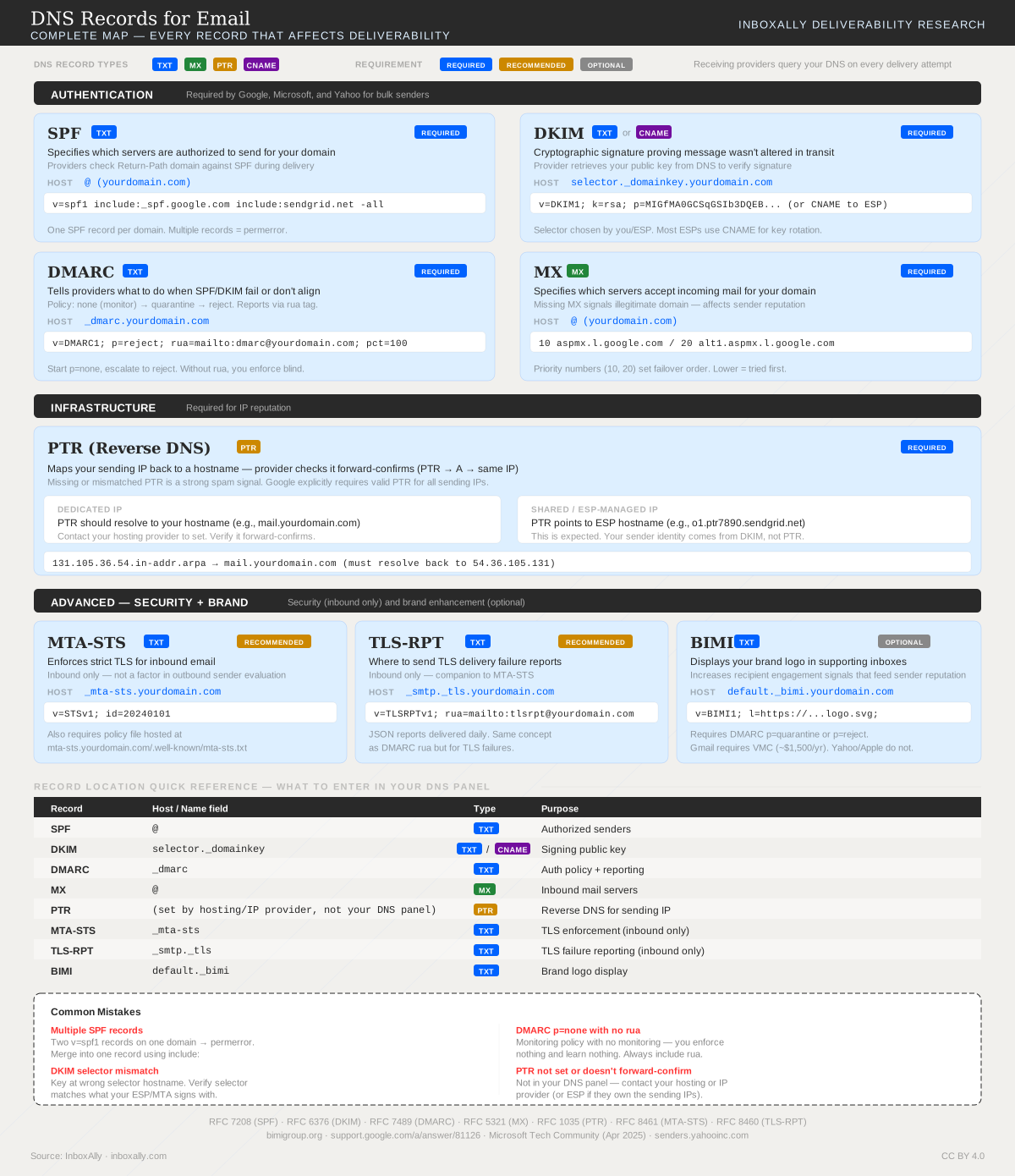
Reverse DNS (rDNS) is a lookup that maps an IP address back to a hostname using a PTR (pointer) record. In email, mailbox providers use rDNS as a quick trust signal: the IP you’re sending from should resolve to a sensible hostname that aligns with your sending identity.
What reverse DNS / PTR records are (in plain terms)
A normal DNS lookup finds an IP from a domain (e.g., mail.example.com → 203.0.113.10). Reverse DNS does the opposite: it finds a hostname from an IP (e.g., 203.0.113.10 → mail.example.com) using a PTR record.
PTR records live in the IP owner’s DNS (the “reverse” zone), not in your typical domain DNS zone.
Why mailbox providers check reverse DNS
Mailbox providers and spam filters commonly check rDNS during the SMTP connection because it helps validate that the sending infrastructure is legitimate and consistently configured.
They use it to:
- Reduce spam and abuse: Many spam sources come from compromised or throwaway servers with missing or generic rDNS.
- Support the authentication chain: rDNS isn’t a replacement for SPF/DKIM/DMARC, but it complements them as an infrastructure sanity check.
- Improve traceability: A meaningful hostname is easier to log and investigate than a raw IP address.
What providers typically expect:
- The sending IP has a PTR record (rDNS exists).
- The PTR points to a hostname that looks intentional (not random).
- Often (not always), the hostname also has a forward DNS record back to the same IP (this is sometimes called forward-confirmed reverse DNS).
If rDNS is missing or clearly misconfigured, some providers will throttle, spam-folder, or reject mail—especially from new or low-reputation IPs.
How to check your PTR record
You can check rDNS from your own computer in a few seconds. You’ll need the sending IP address (the public IP your mail server or ESP uses).
Option 1: dig -x (macOS/Linux)
dig -x 203.0.113.10 +short
Option 2: nslookup (Windows/macOS/Linux)
nslookup 203.0.113.10
Option 3: Online checks (quick verification)
If you suspect reputation or blocking issues alongside rDNS problems, run your IP/domain through InboxAlly’s free Spam Database Lookup to see if you’re listed on major blocklists:
Spam Database Lookup
What “good” looks like: the command returns a hostname (for example, mail.example.com.). What’s concerning: no result (NXDOMAIN), or a generic provider hostname that doesn’t match your sending identity.
How to set up or fix reverse DNS (the key detail most senders miss)
PTR records are controlled by whoever owns the IP address, not by whoever owns the domain.
That usually means:
- Your hosting provider
- Your VPS/cloud provider
- Your ISP
- Your email service provider (ESP) (if they provide the sending IP)
What to do
- Identify the sending IP
- Check your mail server configuration, your ESP documentation, or your SMTP relay settings.
- Determine who owns that IP
- If you’re on a VPS/dedicated server, it’s typically your VPS provider.
- If you’re on shared hosting, it’s the hosting company.
- If you’re using an ESP, it’s usually the ESP (and you may not control rDNS at all).
- Request a PTR record change from the IP owner
- Ask them to set the PTR to a hostname you control, commonly something like:
mail.yourdomain.comorsmtp.yourdomain.com
- Ask them to set the PTR to a hostname you control, commonly something like:
- Make sure the hostname resolves forward to the same IP
- Create an A record in your domain DNS so:
mail.yourdomain.com → 203.0.113.10
- This alignment helps avoid “reverse/forward mismatch” flags.
- Create an A record in your domain DNS so:
If you don’t have control of the IP (common with shared hosting or many ESP plans), you typically cannot set rDNS yourself—your best option is to ask the provider what they support or move to an option that includes a dedicated IP.
Common reverse DNS problems (and what they mean)
- Missing PTR record
- Symptom:
dig -xreturns nothing / NXDOMAIN. - Impact: Higher chance of filtering, throttling, or outright rejection.
- Symptom:
- PTR points to a generic hostname
- Example:
ip-123-45-67-89.provider.com - Impact: Not always fatal, but can be a trust negative—especially for cold IPs or strict receivers.
- Example:
- PTR mismatch (PTR doesn’t align with your sending domain)
- Example: You send as
@yourdomain.combut rDNS resolves tomail.otherdomain.com. - Impact: Can look like spoofing or poor infrastructure hygiene.
- Example: You send as
- Forward/reverse mismatch
- PTR points to
mail.yourdomain.com, butmail.yourdomain.comdoes not resolve back to the sending IP. - Impact: Some filters treat this as suspicious.
- PTR points to
If you’re also seeing deliverability drops, timeouts, or blocks, check whether your IP/domain reputation is contributing. InboxAlly’s Spam Database Lookup can quickly surface blocklist listings, and Domain Reports (in the InboxAlly platform) can help you monitor authentication and reputation signals over time.
When reverse DNS matters most (and when it usually doesn’t)
It matters most when:
- You send from a dedicated IP (your own mail server, dedicated SMTP relay, or dedicated IP add-on).
- You’re warming up a new IP or troubleshooting bounces/blocks.
- You send higher volume and need consistent infrastructure signals.
It usually matters less when:
- You send through an ESP on a shared IP pool.
- In that case, the ESP typically manages rDNS for the shared sending IPs, and you won’t be able to change it.
- Your focus should shift to list hygiene, content, complaint rates, and authentication (SPF/DKIM/DMARC).
Shared vs. dedicated IP: what to expect
- Shared IP
- rDNS is managed by the provider.
- You generally can’t (and don’t need to) set PTR records yourself.
- Deliverability depends heavily on the shared pool’s reputation and your sending behavior.
- Dedicated IP
- You (or your provider) should configure rDNS specifically for your sending domain.
- A clean, matching PTR + forward DNS is a baseline requirement for professional sending.
If you’re on a dedicated IP and rDNS is wrong, fix it first—then validate reputation and blocklists using InboxAlly’s Spam Database Lookup and monitor ongoing signals in Domain Reports.