


How Sender Reputation Works
Each major mailbox provider maintains its own internal evaluation of your sending domain and IP addresses. There is no single universal “sender score” — Gmail, Microsoft, and Yahoo each assess you independently using their own models. These evaluations are not publicly visible as a number, but monitoring tools provide partial visibility (see below).
Reputation is built from signals that vary in impact:
High-impact signals — these can damage reputation in a single campaign:
- Spam complaints — recipients marking your email as spam. Above 0.3% complaint rate is dangerous. Above 0.1% is where Google starts paying attention.
- Spam trap hits — sending to addresses that exist solely to catch bad senders. Even a small number signals list quality problems.
- Blocklist inclusion — landing on Spamhaus, Barracuda, or similar lists can cause immediate rejection at scale.
Steady-state signals — these build or erode reputation over time:
- Engagement signals — opens, clicks, replies, read time. Consistent positive engagement is the strongest reputation builder.
- Bounce rates — high hard bounce rates signal bad list hygiene and erode reputation gradually.
- Sending volume and consistency — sudden spikes raise flags, but so does going silent. If you send consistently then stop for months, you effectively lose your established reputation and need to warm up again.
- Email authentication — SPF, DKIM, DMARC compliance. Authentication failures don’t just hurt reputation — they can cause outright rejection regardless of how good your reputation is.
How Providers Differ
Gmail, Microsoft, and Yahoo don’t evaluate reputation the same way:
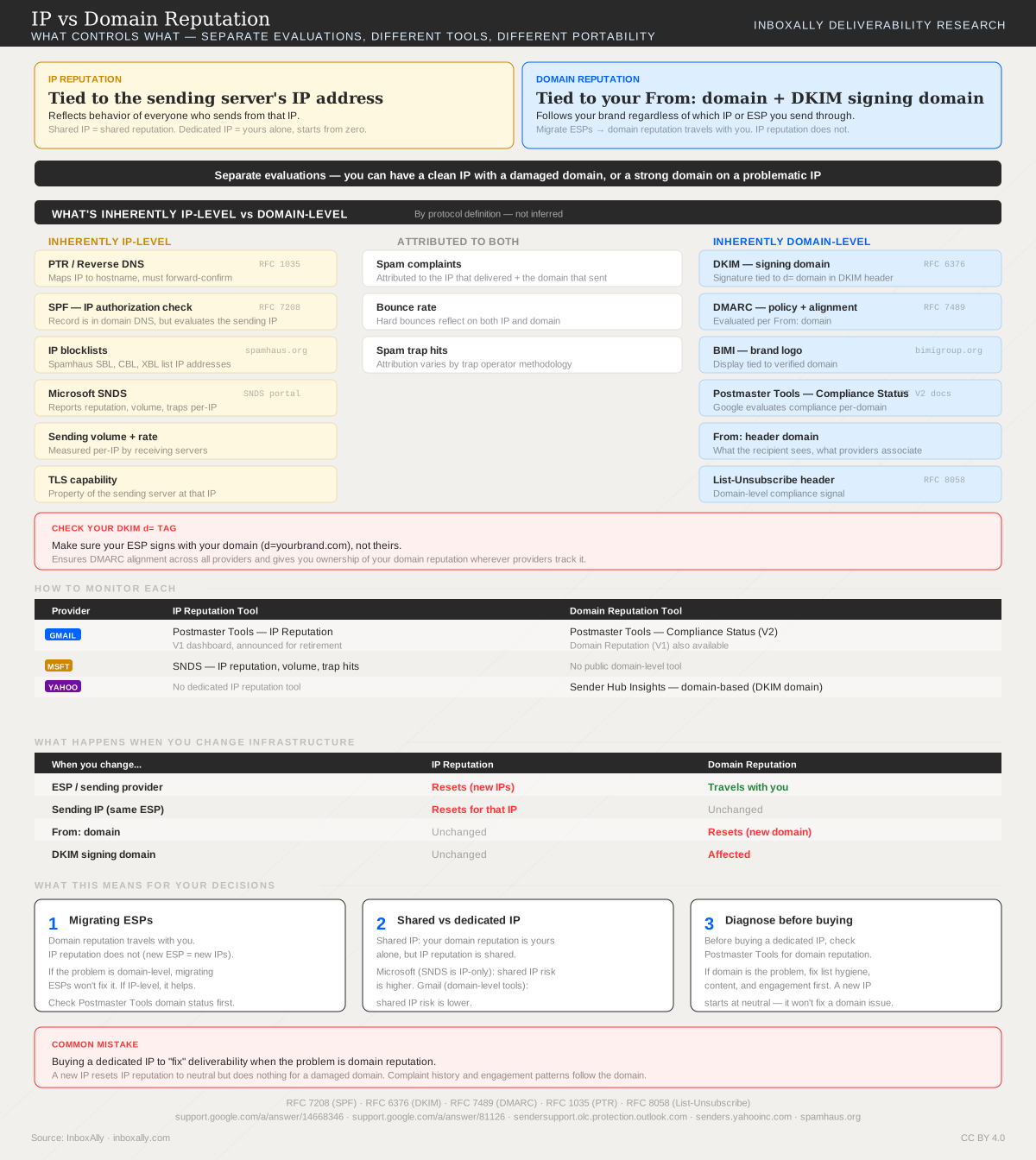
Gmail weighs domain reputation heavily and provides the most visibility through Postmaster Tools. Domain reputation and Compliance Status (V2) are the primary dashboards. Gmail also tracks IP reputation but has announced V1 IP dashboards for retirement. For most Gmail troubleshooting, domain reputation is where you start.
Microsoft provides IP-level monitoring through SNDS but has no public domain reputation tool. This doesn’t mean Microsoft ignores domain signals — it means you can’t see them. Microsoft’s filtering tends to be more aggressive on IP-level signals, making shared IP quality and blocklist status more critical for Outlook/Hotmail delivery.
Yahoo monitors reputation by DKIM signing domain through Sender Hub Insights. No IP-level tool. Yahoo explicitly states that following their recommendations provides consistent reputation “regardless of which IP mail is sent from.”
For the full breakdown of what’s IP-level vs domain-level, see IP vs Domain Reputation.
How to Check Your Reputation
| Provider | Tool | What It Shows |
|---|---|---|
| Gmail | Google Postmaster Tools | Domain reputation (High/Medium/Low/Bad), Compliance Status, IP reputation, spam rate, authentication rates |
| Microsoft | SNDS | Per-IP reputation (Green/Yellow/Red), volume, trap hits |
| Yahoo | Sender Hub | Domain-based insights, complaint rates, authentication status |
| Cross-provider | InboxAlly Spam Database Lookup | Blocklist status across major lists |
If you’re below a provider’s data threshold (common for lower-volume senders), these tools may show no data. In that case, monitor what you can measure directly: complaint rates from your ESP, bounce rates, and blocklist status.
Building vs Losing Reputation
Reputation is asymmetric — it takes weeks or months of consistent, low-complaint sending to build, and it can be damaged in a single campaign.
Building reputation:
- Consistent sending to engaged recipients over weeks/months
- Low complaint rates (below 0.1%)
- Low bounce rates (below 2%)
- Strong authentication (SPF + DKIM + DMARC passing)
- Gradual volume increases during warmup
Damaging reputation:
- A single campaign with high complaint rates can drop you from “High” to “Low” in Google Postmaster Tools
- Hitting a spam trap — even once — signals a list quality problem that providers take seriously
- A volume spike without warmup looks like compromised infrastructure or spam behavior
- Going silent for months, then resuming at previous volume — providers treat you as effectively new again
Recovery is possible but slow. It follows a similar pattern to initial warmup: reduce volume to your most engaged recipients, fix the root cause, and gradually rebuild. See reputation recovery for the full process.
Why Sender Reputation Matters
Sender reputation is a primary factor in inbox placement. A strong reputation means your emails go to the inbox by default. A damaged reputation means even legitimate, wanted emails may land in spam — and recipients who would have engaged never get the chance.
The compounding effect is what makes reputation so critical: damaged reputation → spam placement → less engagement → further reputation damage. Breaking this cycle requires deliberate intervention, not just “sending better email.”
How InboxAlly Helps
InboxAlly breaks the negative reputation cycle by generating consistent positive engagement signals through seed emails. Seeds open, read, and interact with your email — giving providers the behavioral data that signals a trusted sender. This is most valuable in three scenarios: during email warmup when you have no established reputation, during reputation recovery when you need to rebuild trust after a setback, and during steady-state sending to maintain the engagement baseline that sustains your reputation.