

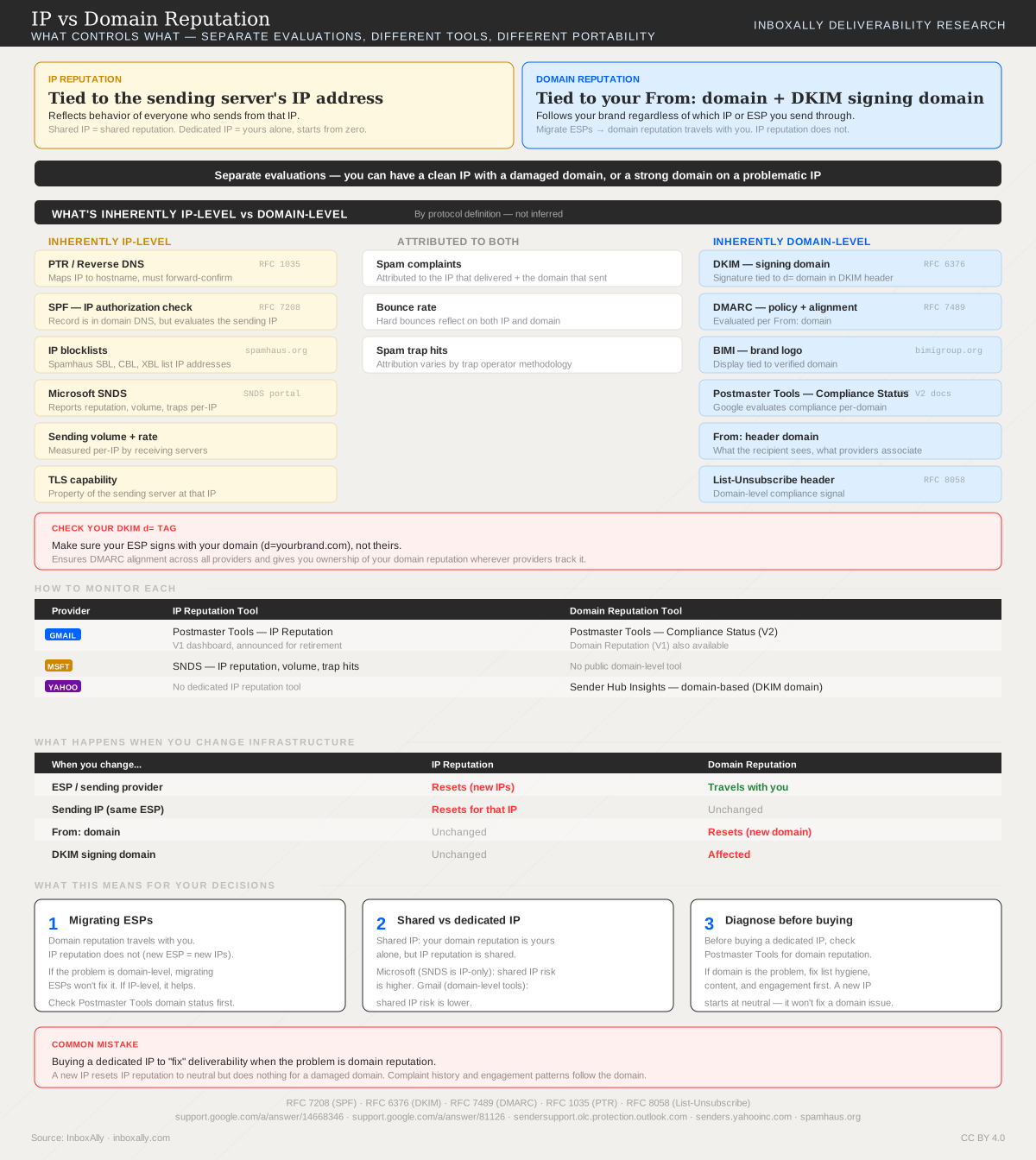
The Core Distinction
IP reputation reflects the behavior of everyone who sends from a given IP address. On a shared IP, you share that reputation with other senders. On a dedicated IP, the reputation is yours alone — but it starts from unknown, not neutral. Most providers throttle unknown IPs aggressively, which is why warmup exists.
Domain reputation follows your brand. It’s tied to the From: header domain and your DKIM signing domain (d= tag). Change ESPs, change IPs — domain reputation travels with you. A brand-new domain also starts from unknown — just like a new IP — and needs to build reputation through consistent, low-complaint sending before providers trust it at volume.
These are independent evaluations. A clean IP won’t save a damaged domain, and a strong domain can still be dragged down by a problematic IP.
Subdomain isolation adds a practical lever: separating transactional mail (mail.brand.com) from marketing (promo.brand.com) lets you build and protect reputations independently. A spike in marketing complaints won’t drag down your transactional delivery. How much isolation you actually get varies by provider — Google treats subdomains with more independence than some others, and a severely damaged parent domain can still cast a shadow. But for most senders, subdomain separation is the single most effective way to protect critical mail streams.
What’s Inherently IP-Level vs Domain-Level
This distinction is structural — it follows from protocol specifications, not inferred from provider behavior.
IP-level by definition — these are what you’re managing when you warm up a new IP, investigate a blocklisting, or decide between shared and dedicated:
- PTR / Reverse DNS — maps IP to hostname (RFC 1035)
- SPF — authorizes sending IPs (RFC 7208). The record lives in domain DNS, but SPF evaluates the connecting IP.
- IP blocklists — Spamhaus SBL, CBL, XBL list IP addresses
- Microsoft SNDS — reports reputation per-IP
- Sending volume and rate — measured per-IP by receiving servers
Domain-level by definition — these are what follow you when you migrate ESPs, and what you damage when you send to bad lists regardless of which IP you use:
- DKIM — signature tied to
d=domain (RFC 6376) - DMARC — policy evaluated per From: domain (RFC 7489). Note: SPF alignment for DMARC is a domain-level check even though SPF evaluation is IP-level.
- BIMI — brand logo tied to verified domain
- Google Postmaster Tools Compliance Status — evaluates per-domain
- List-Unsubscribe — domain-level compliance signal (RFC 8058)
Attributed to both: Spam complaints, bounce rates, and spam trap hits are attributed to the IP that delivered and the domain that sent. The attribution mechanism itself illustrates the split — Gmail’s feedback loop reports complaints by DKIM signing domain (domain-level), while Microsoft’s JMRP reports by delivering IP (IP-level).
IP and domain reputation are not the full picture. Modern providers also use per-recipient engagement — whether a specific user opens, reads, or deletes mail from a specific sender. IP and domain reputation set the baseline; engagement history between you and each recipient refines it.
How to Monitor Each
| Provider | IP Reputation | Domain Reputation |
|---|---|---|
| Gmail | Postmaster Tools — IP Reputation (V1) | Postmaster Tools — Compliance Status (V2) |
| Microsoft | SNDS — per-IP reputation, volume, traps | No public domain-level tool |
| Yahoo | No dedicated IP tool | Sender Hub Insights — domain-based (DKIM domain) |
Google provides both. Microsoft’s public tooling is IP-only — but Microsoft absolutely uses domain signals internally for filtering. The gap is in monitoring visibility, not in what Microsoft evaluates. Yahoo is domain-only.
Portability
| When you change… | IP Reputation | Domain Reputation |
|---|---|---|
| ESP / sending provider | Resets (new IPs) | Travels with you |
| Sending IP (same ESP) | Resets for that IP | Unchanged |
| From: domain | Unchanged | Resets (new domain) |
| DKIM signing domain | Unchanged | Affected |
This table answers the most common question in ESP migration: “Will my reputation follow me?” It depends on which reputation.
One nuance: “travels with you” is directionally correct but not instant. During an ESP migration, providers re-evaluate your domain in the context of new sending infrastructure. Domain reputation follows, but expect a brief dip in delivery performance during the transition — especially if the new ESP’s IPs are unknown to providers.
When Dedicated IP Makes Sense (and When It Doesn’t)
A dedicated IP isn’t a universal upgrade — it’s a tool that requires specific conditions to work:
Below ~50,000 emails/month: Stick with shared IP. You don’t generate enough sending volume for providers to build a meaningful reputation profile. A dedicated IP at low volume stays permanently unknown — which is worse than a well-managed shared pool. Focus on domain reputation instead.
50,000–100,000+/month: Dedicated IP becomes viable if you can commit to a consistent warmup schedule and maintain steady volume. Gaps in sending reset progress. Most ESPs charge a monthly fee per dedicated IP — check your provider’s pricing.
High volume with multiple mail streams: Consider multiple dedicated IPs — one for transactional, one for marketing. Combined with subdomain isolation, this gives you independent reputation control per mail stream.
The real decision: Dedicated IP gives you control over IP reputation but demands volume and consistency to maintain it. Shared IP outsources IP reputation management to your ESP — and on a strict ESP with good sender enforcement, shared pool quality can be better than a dedicated IP you can’t properly warm. In both cases, domain reputation is yours to build or damage.
Common Mistakes
Buying a dedicated IP to “fix” deliverability when the problem is domain reputation. A new dedicated IP starts at unknown — providers will throttle it until you prove yourself through warmup. It does nothing for a damaged domain. Before buying a dedicated IP, check Google Postmaster Tools for domain reputation. If you’re below Google’s data threshold (common for lower-volume senders), look at complaint rates, bounce rates, and blocklist status instead — these are domain-level signals you can measure without GPT. If the domain is the problem, fix list hygiene, content, and engagement first.
Migrating ESPs to escape a bad domain reputation. Domain reputation follows you. New ESP, same domain, same problem. If the domain is damaged, the fix is list hygiene and engagement — not a fresh set of IPs.
Not checking the DKIM d= tag. Make sure your ESP signs with your domain (d=yourbrand.com), not theirs. This ensures DMARC alignment and gives you ownership of your domain reputation. Some ESPs use a shared signing domain by default — you may need to specifically request custom DKIM.
How InboxAlly Helps
InboxAlly’s seed emails generate the engagement signals that build domain reputation. Two scenarios where this matters most: during an ESP migration, seeds keep domain-level engagement consistent while your new IPs are still unknown and throttled. During a dedicated IP warmup, strong domain reputation from seed engagement gives providers a reason to trust mail from an IP they haven’t seen before — you’re not starting from unknown on both dimensions at once.